The best wireless label printers make it easier to print shipping labels, barcodes, file labels, and product stickers without being tied to a desktop computer. Bluetooth and Wi-Fi models can streamline order fulfillment while reducing the need for ink or toner.
This roundup compares 10 options across connectivity, label size, software support, portability, and small-business usability so you can choose a printer that fits your workflow.
Best 10 Wireless Label Printers Picks for 2026
Flexible Bluetooth Shipping Pick

- Inkless 203 DPI thermal printing
- Bluetooth, USB, and mobile app support
- Handles roll and fanfold labels
Best For: Small online businesses shipping marketplace orders
Connected Office Labeling Pick
Brother QL-820NWB Professional

- Bluetooth, Wi-Fi, Ethernet, and USB
- LCD supports standalone operation
- Fast 300 DPI monochrome printing
Best For: Networked offices and shared labeling workflows
High-Speed USB Shipping Pick

- One 4x6 label per second
- No ink or toner required
- Works with major shipping platforms
Best For: Fast computer-based e-commerce shipping
Mobile-Friendly Labeling Pick
Phomemo 241BT Bluetooth Printer

- Bluetooth app printing for Android and iOS
- USB support across major computer systems
- Includes 20 labels and prints up to 150 mm/s
Best For: Mixed-device home and small-business labeling
Best Wide-Format Pick

- Prints labels up to 4 inches wide
- Wi-Fi, Bluetooth, Ethernet, and USB connectivity
- Barcode tools and network-management support
Best For: Wide shipping labels and business workflows
Best Template-Friendly Option
KNAON Bluetooth Shipping Label Printer
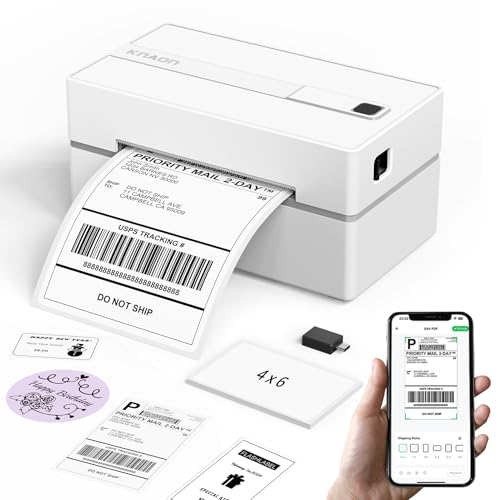
- Bluetooth app and USB connectivity
- 3,000+ templates and 5,000+ icons
- Supports labels up to 4.2 inches wide
Best For: Mobile labeling, shipping, and DIY designs
Best Quiet High-Volume Pick
MUNBYN RW403B Bluetooth Label Printer

- Supports labels from 1.57 to 4.25 inches wide
- Automatic calibration helps reduce misalignment
- Ink-free printing with quiet operation
Best For: Regular shipping and inventory label printing
Best Bluetooth Shipping Pick
Nelko PL70E 4x6 Thermal Label Printer

- Bluetooth printing through the NELKO app
- Up to 72 4x6 labels per minute
- Supports roll and fanfold labels
Best For: Small businesses and home sellers needing flexible shipping-label printing
Best Compact Multi-System Option
Rongta RP425 Bluetooth Label Printer
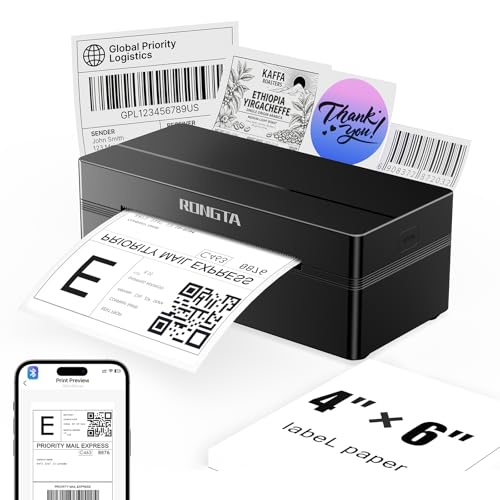
- Bluetooth support for iOS and Android
- Automatic label detection and feeding
- Supports labels from 0.98 to 4.37 inches
Best For: Users printing labels across phones, tablets, and computers
Best Value Starter Kit
Mvgges POS-9270 Bluetooth Label Printer

- Bluetooth mobile printing plus USB
- Prints up to 160 mm/s
- Includes 30 test labels
Best For: Home users and small online businesses starting with 4x6 labels
Flexible Bluetooth Shipping Pick – JADENS 4×6 Thermal Printer
The JADENS Bluetooth Thermal Shipping Label Printer is a practical choice among wireless label printers for small businesses that need inkless 4×6 shipping labels. It supports Bluetooth printing on compatible Windows and Mac computers, while Android and iOS devices use the JADENS Printer app. USB connectivity is also available.
Best For: Online sellers who need affordable, wireless or USB printing for shipping, warehouse, and marketplace labels.
Pros:
- 203 DPI direct thermal printing requires no ink or toner.
- Supports Bluetooth on Windows 8 or later and Mac, plus app-based mobile printing.
- Works with fanfold and roll labels from 1.57 to 4.1 inches wide.
- Compatible with platforms including Amazon, eBay, Shopify, ShipStation, and Shippo.
Cons:
- Android and iOS printing requires the JADENS Printer app rather than direct Bluetooth printing.
- Label size calibration is required when changing labels.
- Prints monochrome only.
With a one-year warranty and setup resources supplied on the included U-Disk, this model offers useful flexibility for home-based shipping operations, provided app requirements and calibration steps fit your workflow.
Connected Office Labeling Pick – Brother QL-820NWB Professional
The Brother QL-820NWB is one of the more versatile wireless label printers for offices that need multiple connection methods. It supports Bluetooth, Wi-Fi, Ethernet, and USB, and its LCD allows standalone operation for certain tasks without relying entirely on a computer.
Best For: Offices and workgroups that need network-ready labeling, fast address-label production, and flexible device connectivity.
Pros:
- Offers Bluetooth, wireless networking, Ethernet, and USB connectivity.
- Prints up to 110 standard address labels per minute according to the supplied specifications.
- 300 DPI printing supports clear monochrome labels.
- Can produce black-and-red labels with compatible DK-2251 tape.
Cons:
- Its maximum media size is listed as 3 x 5 inches, so it is not a typical 4×6 shipping-label printer.
- Color printing is limited to compatible black-and-red media.
- Its broader office connectivity may be more than a basic home labeling setup requires.
The QL-820NWB stands out when shared access and connection flexibility matter more than 4×6 shipping-label compatibility. Its LCD and network interfaces make it especially suitable for organized office workflows.
High-Speed USB Shipping Pick – Rollo Commercial Grade 4×6
The Rollo USB Shipping Label Printer is a strong wired alternative to wireless label printers for users who primarily print from a Windows PC or Mac. Its direct thermal design avoids ink and toner, and its 203 DPI print head produces 4×6 labels at up to one label per second.
Best For: E-commerce sellers who want fast, dependable USB printing for shipping, warehouse, barcode, and custom labels.
Pros:
- Prints one 4×6 label per second at up to 150 mm/s.
- Direct thermal operation eliminates ink and toner purchases.
- Supports labels from 1.57 to 4.1 inches wide.
- Works with major carriers, marketplaces, and shipping platforms.
Cons:
- USB is the listed connectivity type, so it does not provide wireless printing.
- Requires a Windows or Mac computer for the stated setup.
- Print resolution is 203 DPI.
Although it is not wireless, the Rollo is worth considering when speed and broad shipping-platform compatibility take priority. The optional Rollo Ship app can also provide shipping tools and access to shipping rates.
Mobile-Friendly Labeling Pick – Phomemo 241BT Bluetooth Printer
The Phomemo 241BT is a versatile option among wireless label printers, combining Bluetooth mobile printing with USB support for computers. The Labelife app handles Android and iOS printing, while drivers and extensions support Windows, Mac, Chrome OS, and Linux workflows.
Best For: Home users and small businesses that want to print shipping, barcode, QR-code, and general labels from phones or computers.
Pros:
- Supports Bluetooth printing through the Labelife app on Android and iOS.
- USB compatibility extends to Windows, Mac, Chrome OS, and Linux systems.
- Accepts label widths from 1 to 4.6 inches.
- Prints at up to 150 mm/s and includes 20 labels.
Cons:
- Mobile printing requires the Labelife app.
- Computer setup requires the appropriate driver, and Chrome OS uses a browser extension.
- Prints black-and-white labels only.
The 241BT is a flexible pick for mixed-device households and small businesses. Its wide operating-system support and included labels make it convenient to start, though app and driver setup should be expected.
Best Wide-Format Pick – Brother QL-1110NWB
The Brother QL-1110NWB is a strong choice among wireless label printers when you need wide labels for shipping, postage, barcodes, or name badges. It supports wireless, Bluetooth, Ethernet, and USB connectivity, with printing up to 4 inches wide.
Best For: Small businesses, shipping desks, and users who need wide-format labels plus network-management features.
Pros:
- Prints labels up to 4 inches wide, including mailing, postage, barcode, and visitor labels.
- Supports Wi-Fi, Bluetooth, Ethernet, and USB connections.
- Offers barcode cropping, network tools, SDKs, and a plug-and-label feature for Windows PCs.
- Includes starter rolls and a two-year limited warranty.
Cons:
- The barcode crop function is limited to Windows.
- Compatibility details list older Windows and macOS versions rather than newer operating systems.
- It is less compact than the portable models in this roundup.
Choose the QL-1110NWB if flexibility and business-oriented connectivity matter more than minimal size. Its wide media support and integration features make it particularly practical for established shipping or labeling workflows.
Best Template-Friendly Option – KNAON Bluetooth Shipping Label Printer
The KNAON is a compact option among wireless label printers, combining Bluetooth printing with USB connectivity for Windows, macOS, ChromeOS, and Linux. Its app adds templates and design tools for shipping, barcode, price, and organization labels.
Best For: Home sellers, crafters, and small businesses that want mobile printing and a large library of label designs.
Pros:
- Supports Bluetooth through the FlashLabel Pro app and USB connections across several operating systems.
- Includes more than 3,000 templates, 5,000 icons, and 100 fonts in the app.
- Works with major platforms including Amazon, Etsy, Shopify, USPS, UPS, and eBay.
- Prints at speeds up to 180 mm/s and supports media from 1.5 to 4.2 inches wide.
Cons:
- Bluetooth printing requires the FlashLabel Pro app rather than a direct device connection.
- Shipping-platform labels must be saved as PDFs and imported into the app.
- The supplied resolution is 200 x 200 dpi, lower than the Brother model’s listed resolution.
The KNAON is appealing when app-based design flexibility is a priority. Its broad platform support and compact body suit occasional or regular shipping, though the required app workflow may add a step to printing.
Best Quiet High-Volume Pick – MUNBYN RW403B Bluetooth Label Printer
The MUNBYN RW403B is a practical wireless label printer for shipping and general organization, supporting direct thermal labels from 1.57 to 4.25 inches wide. Its automatic calibration, stated low jam rate, and quiet operation are useful for repeated printing.
Best For: Small businesses, home offices, and users who print shipping, inventory, barcode, or organization labels regularly.
Pros:
- Handles multiple label sizes from 1.57 to 4.25 inches wide.
- DAC technology automatically calibrates labels to help reduce misalignment.
- Thermal operation requires no ink, with a stated life of up to 970,000 labels.
- Runs at about 60 dB and includes a two-year manufacturer warranty.
Cons:
- The listed wireless connection is Bluetooth, with USB as the hardware interface.
- It is larger than the KNAON according to the supplied dimensions.
- Some advanced claims, including the stated label lifespan and near-zero jam rate, are manufacturer specifications rather than independently verified results.
The RW403B stands out for users who value consistent, quieter label production and broad media flexibility. It is a sensible fit for recurring shipping or inventory work, especially where avoiding ink and reducing alignment issues are priorities.
Best Bluetooth Shipping Pick – Nelko PL70E 4×6 Thermal Label Printer
For shoppers comparing wireless label printers, the Nelko PL70E stands out with Bluetooth support through its NELKO app, plus USB connectivity for compatible computers. It prints monochrome labels at up to 150 mm/s and uses direct thermal technology, so there is no ink or toner to replace.
Best For: Small businesses and home sellers who want flexible Bluetooth or USB printing for shipping, barcode, price, and other small labels.
Pros:
- Supports Bluetooth printing through the NELKO app on iOS and Android, with additional computer compatibility.
- Prints up to 72 4×6 labels per minute at 203 DPI.
- Works with fanfold and roll labels from 1.54 to 4.1 inches wide.
- Compatible with platforms including Amazon, eBay, Shopify, USPS, UPS, Etsy, and PayPal.
Cons:
- Mac users can print only through USB, according to the supplied notes.
- Bluetooth printing requires the NELKO app rather than a direct device connection.
The Nelko is a practical choice if you need fast 4×6 shipping-label output and broad platform support in a compact printer. Its app-based Bluetooth setup is versatile, though Mac users should plan on using the USB connection.
Best Compact Multi-System Option – Rongta RP425 Bluetooth Label Printer
The Rongta RP425 is one of the more flexible wireless label printers for users who move between phones, tablets, and computers. Its app-based Bluetooth printing works with iOS and Android, while drivers support Windows, Mac OS, and Chrome OS for USB-connected printing.
Best For: Offices, small businesses, and mobile users who need automatic label feeding and support for several operating systems.
Pros:
- Supports Bluetooth printing from iOS and Android devices through the RONGTA app.
- Automatically detects, grabs, and feeds labels.
- Accepts direct thermal labels from 0.98 to 4.37 inches wide.
- Prints at up to 150 mm/s with 203 DPI resolution.
Cons:
- Computer setup requires downloading the driver from Rongta’s official website.
- The supplied specifications list a limited one-year warranty.
Choose the RP425 if automatic feeding and broad operating-system compatibility matter more than a specialized app experience. Its compact design and wide label-size range make it suitable for both shipping and smaller barcode or QR-code labels.
Best Value Starter Kit – Mvgges POS-9270 Bluetooth Label Printer
The Mvgges POS-9270 is a straightforward option among wireless label printers, combining app-based Bluetooth printing for Android and iOS with USB printing for Windows and Mac. Its 203 DPI thermal output and included test labels make it an accessible starting point for shipping and inventory tasks.
Best For: Home users and small online businesses that want a simple 4×6 printer with both wireless mobile printing and wired computer support.
Pros:
- Prints wirelessly from Android and iOS devices through a Bluetooth printing app.
- Supports USB printing on Windows and Mac systems.
- Prints at up to 160 mm/s and supports labels from 1.37 to 4.1 inches wide.
- Includes 30 test labels, a power adapter, USB cable, and manual.
Cons:
- Bluetooth is limited to Android and iOS; Wi-Fi is not supported.
- Windows and Mac printing requires a USB cable and driver setup.
The POS-9270 offers the core features most small sellers need without requiring ink or toner. It is a sensible starter choice if you mainly print 4×6 shipping labels and can work within its app-based Bluetooth and USB-only computer connections.
How We Picked the Best Wireless Label Printers
We focused on the features that matter most in everyday label printing: wireless connectivity, compatibility with common devices and shipping platforms, print quality, supported label widths, setup simplicity, and operating cost. We also considered whether each model is better suited to occasional home use, high-volume shipping, retail labeling, or professional office workflows.
Thermal printers generally use heat-sensitive labels instead of ink, which can lower ongoing supply costs. However, wireless performance and software support vary, so buyers should confirm that a printer works with their preferred phone, computer, operating system, and label service before purchasing.
Quick Comparison
| Best For | What to Look For |
|---|---|
| Online sellers | Reliable 4 x 6-inch printing, shipping-platform compatibility, and fast output |
| Small offices | Flexible connectivity, dependable software, and support for multiple label formats |
| Retail and barcodes | Clear monochrome printing and compatibility with narrow or wide labels |
| Home organization | Simple mobile setup, compact size, and affordable label supplies |
| Mobile workspaces | Bluetooth pairing, portability, and low setup overhead |
Key Buying Factors for Wireless Label Printers
Connectivity and Device Support
Bluetooth is convenient for printing from phones and tablets, while Wi-Fi or Ethernet can be more practical for shared office access. Check whether the companion app supports Android, iOS, Windows, or macOS as needed. Some printers advertise wireless capability but still require a computer for certain label types or advanced settings.
Label Size and Software Compatibility
Most shipping workflows use 4 x 6-inch labels, but compact labels are better for folders, shelves, products, and barcodes. Confirm the printer’s supported width range and whether it works with your marketplace, carrier, inventory system, or design software. Automatic label detection and alignment can save time during busy packing sessions.
Print Speed, Resolution, and Operating Cost
Higher speed matters when processing many orders, while adequate resolution keeps barcodes and small text readable. Since thermal printers do not use ink, compare the price and availability of compatible labels. Direct thermal labels can fade over time, so they may not be ideal for permanent records or long-term outdoor use.
Size and Ease of Setup
Measure your workspace before choosing a model. A compact Bluetooth printer may suit a home office, whereas a larger professional unit can offer more connectivity and label flexibility. Look for clear setup instructions, reliable driver or app support, and easy access to replacement rolls.
Who Should Buy Which Wireless Label Printers?
Choose a dedicated 4 x 6 shipping printer if you sell regularly through online marketplaces or ship products for a small business. These models prioritize fast, consistent label output and are usually the simplest choice for fulfillment.
Choose a professional Brother model if you need broader label-format support, dependable office connectivity, or advanced barcode and postage workflows. A compact Bluetooth option is a better fit for casual sellers, home offices, and users who primarily print from a phone.
For shared workspaces, prioritize Wi-Fi or network connectivity. For occasional organization projects, focus on low cost, straightforward mobile pairing, and inexpensive labels rather than maximum speed. Before ordering, verify the included accessories, label compatibility, return policy, and the exact wireless connection method your devices require.