The best wireless gaming mice combine low-latency performance with the freedom of a cable-free setup. The right choice depends on more than DPI: weight, shape, grip comfort, controls, battery life, and connection options all affect how a mouse feels in daily play.
We compared 10 wireless gaming mice across budgets and play styles, from lightweight competitive models to feature-rich designs with extra buttons and RGB lighting.
Best 10 Wireless Gaming Mice Picks for 2026
Best Budget Pick
Logitech G305 Lightspeed Wireless Gaming Mouse

- 12,000 DPI HERO sensor with 400 IPS tracking
- Up to 250 hours on one AA battery
- Lightweight 3.4-ounce design with receiver storage
Best For: Affordable, portable wireless gaming
Best Ultra-Light Option
ATTACK SHARK X3 49g Wireless Gaming Mouse

- 49-gram ultra-lightweight design
- 26,000 DPI PAW3395 sensor with 1,000Hz polling
- Bluetooth, 2.4GHz wireless, and wired connectivity
Best For: Competitive players wanting lightweight flexibility
Best Feature-Rich Pick
Logitech G502 Lightspeed Wireless Gaming Mouse

- 11 customizable buttons and adjustable weights
- HERO 25K sensor with up to 25,600 DPI
- Compatible with separately sold POWERPLAY charging
Best For: Right-handed gamers needing extensive controls
Best Customization Value
Redragon M810 PRO Wireless RGB Gaming Mouse

- Eight programmable buttons for macros and keybindings
- Adjustable DPI levels up to 10,000
- Rechargeable battery with RGB lighting modes
Best For: Right-handed gamers wanting controls and RGB
Best for Easy Setup
Razer Basilisk V3 X HyperSpeed

- Nine customizable controls
- HyperSpeed Wireless and Bluetooth
- Up to 535 hours on Bluetooth
Best For: Right-handed gamers seeking customization and long battery life
Budget Customization Pick
Redragon M656 Wireless Gaming Mouse
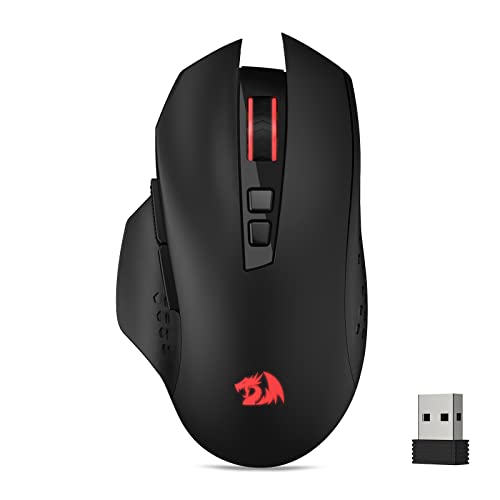
- Seven programmable buttons
- Five DPI levels up to 4,000
- 2.4GHz wireless with ECO sleep mode
Best For: Budget-conscious PC gamers who want remappable controls
Charging-Ready Pick
- HERO sensor up to 25,600 DPI
- Responsive LIGHTSPEED Wireless
- Compatible with optional POWERPLAY charging
Best For: Gamers prioritizing tracking, comfort, and charging convenience
Versatile Quiet Pick

- Three connection modes for PC, tablet, and mobile use
- 12,800 DPI sensor with six adjustable levels
- Silent clicks and rechargeable USB-C operation
Best For: Quiet multitaskers and multi-device users
Competitive FPS Pick

- 82g design supports quick, consistent swipes
- 30K optical sensor for precise tracking
- Up to 280 hours on one AA battery
Best For: Competitive PC and FPS gamers
Travel-Friendly Battery Champ

- Up to 950 hours over Bluetooth
- Under-60g body excluding the battery
- Bluetooth and HyperSpeed wireless modes
Best For: Traveling gamers and portable setups
Best Budget Pick – Logitech G305 Lightspeed Wireless Gaming Mouse
The Logitech G305 is a practical entry point for shoppers comparing wireless gaming mice. Its HERO optical sensor reaches 12,000 DPI and 400 IPS, while LIGHTSPEED wireless delivers a 1 ms report rate for responsive play. A replaceable AA battery provides up to 250 hours of gameplay.
Best For: Gamers who want a lightweight, dependable wireless mouse with long battery life and a compact design.
Pros:
- Up to 250 hours of gameplay from one AA battery.
- Lightweight 3.4-ounce design supports easy maneuverability.
- HERO sensor offers up to 12,000 DPI and 400 IPS precision.
- Built-in receiver storage makes it convenient for travel.
Cons:
- Uses a replaceable AA battery rather than a rechargeable battery.
- Offers six buttons, fewer than many feature-heavy gaming mice.
The G305 focuses on the fundamentals: low-latency wireless performance, efficient power use, and a portable shape. It is a strong choice when you want reliable wireless gaming without unnecessary extras.
Best Ultra-Light Option – ATTACK SHARK X3 49g Wireless Gaming Mouse
The ATTACK SHARK X3 stands out among wireless gaming mice for its 49-gram weight and flexible tri-mode connectivity. It supports Bluetooth 5.2, 2.4GHz wireless, and wired use, while its PAW3395 sensor offers up to 26,000 DPI, 650 IPS, and a 1,000Hz polling rate.
Best For: Players seeking an ultra-light mouse with high-end sensor specifications, rechargeable power, and multiple connection options.
Pros:
- Very light 49-gram design can support quick movement.
- Tri-mode connection works through Bluetooth, 2.4GHz wireless, or USB.
- Rechargeable battery offers up to 200 hours of stated battery life.
- Includes programmable controls, PTFE feet, and an 80-million-click switch rating.
Cons:
- No warranty is listed in the supplied specifications.
- The extensive software configuration may be more than casual users need.
With its low weight, rechargeable battery, and broad connectivity, the X3 is designed for players who prioritize speed and flexibility. Its specifications are especially appealing for competitive FPS use, though buyers should note the lack of a listed warranty.
Best Feature-Rich Pick – Logitech G502 Lightspeed Wireless Gaming Mouse
The Logitech G502 Lightspeed is a feature-rich choice among wireless gaming mice, combining low-latency LIGHTSPEED wireless with 11 customizable buttons and adjustable weights. Its HERO 25K sensor supports up to 25,600 DPI after the listed software upgrade, and it is compatible with Logitech’s separately sold POWERPLAY charging system.
Best For: Right-handed gamers who want extensive button customization, adjustable weight, and an optional wireless charging setup.
Pros:
- Eleven programmable buttons support macros and shortcuts.
- HERO 25K sensor provides 1:1 tracking and up to 25,600 DPI.
- Includes removable 2g and 4g weights for customization.
- POWERPLAY compatibility can maintain charge with the separate charging system.
Cons:
- POWERPLAY wireless charging is sold separately.
- Its 12.96-ounce weight is substantially heavier than lightweight alternatives.
- The design is right-handed rather than ambidextrous.
The G502 Lightspeed makes the most sense for users who will take advantage of its extra controls and adjustable balance. It is less suitable for players seeking the lightest possible mouse, but its customization options are broad.
Best Customization Value – Redragon M810 PRO Wireless RGB Gaming Mouse
The Redragon M810 PRO offers a practical mix of wireless play, programmable controls, and RGB lighting for shoppers comparing wireless gaming mice. Its 2.4GHz connection uses a nano receiver, while the PAW3325 optical sensor supports adjustable DPI levels and a 1,000Hz polling rate.
Best For: Right-handed gamers who want programmable buttons, RGB customization, and rechargeable wireless operation.
Pros:
- Eight programmable buttons support keybindings and macros.
- Five onboard DPI levels can be adjusted from 500 to 10,000 and customized through software.
- Rechargeable battery provides up to 45 hours in eco mode.
- Includes adjustable RGB lighting modes and a 2.4GHz wireless connection.
Cons:
- Listed battery life is shorter than several competing models.
- The mouse is right-handed rather than ambidextrous.
- Some features, including DPI customization and lighting control, require software.
The M810 PRO is a sensible value-oriented option for users who want extra controls and visual customization without moving to a more specialized mouse. Its main trade-off is the comparatively modest 45-hour maximum battery life.
Best for Easy Setup – Razer Basilisk V3 X HyperSpeed
For shoppers comparing wireless gaming mice, the Razer Basilisk V3 X HyperSpeed stands out with a right-handed ergonomic shape, extensive button customization, dual wireless modes, and exceptionally long battery life. Its 18,000-DPI optical sensor and Gen-2 mechanical switches make it a versatile choice for both gaming and everyday PC use.
Best For: Right-handed players who want many programmable controls and long battery life.
Pros:
- Offers nine customizable controls for commands and macros.
- Supports low-latency Razer HyperSpeed Wireless and Bluetooth.
- Provides up to 285 hours over HyperSpeed Wireless or 535 hours over Bluetooth.
- Includes an 18,000-DPI optical sensor, Gen-2 mechanical switches, and Chroma RGB.
Cons:
- Its ergonomic design is intended for right-handed use.
- Uses a replaceable AA battery rather than an included rechargeable battery.
The Basilisk V3 X HyperSpeed is a strong all-around option when customization and endurance matter more than minimizing weight. Bluetooth also gives it useful flexibility for longer sessions and multi-device setups.
Budget Customization Pick – Redragon M656 Wireless Gaming Mouse
The Redragon M656 is a practical entry in the wireless gaming mice category, pairing a 2.4GHz connection with seven programmable buttons and five adjustable DPI levels. Its software support lets you remap controls and create macros for games or productivity tasks.
Best For: Budget-conscious PC users who want programmable buttons and straightforward 2.4GHz wireless.
Pros:
- Provides seven editable buttons, including two side macro buttons.
- Offers five onboard DPI settings from 1,000 to 4,000 DPI.
- Uses a PAW3104 optical sensor with adjustable polling-rate settings.
- Includes an ECO sleep mode and red LED illumination.
Cons:
- The AA battery is not included.
- Its 4,000-DPI maximum is lower than the other listed mice.
- The red scroll-wheel backlight is not always illuminated.
The M656 makes sense if you want wireless freedom and remappable controls without needing premium sensor specifications. It is best suited to PC gamers who value useful customization and a simple feature set.
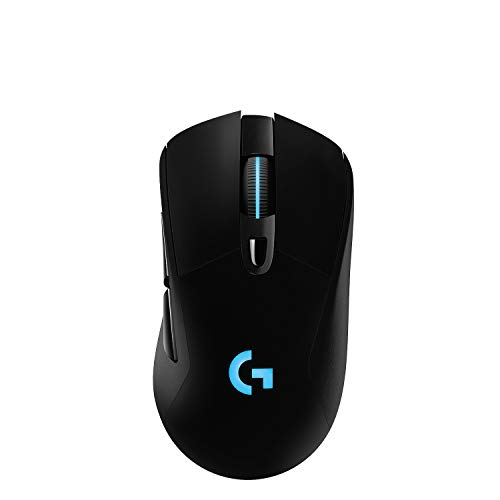
Charging-Ready Pick – Logitech G703 LIGHTSPEED
The Logitech G703 LIGHTSPEED is one of the more performance-focused wireless gaming mice here, combining a HERO sensor, low-latency LIGHTSPEED connectivity, a comfortable rubber-grip design, and a 95-gram build. It also supports Logitech’s optional POWERPLAY wireless charging system.
Best For: Players who prioritize responsive tracking, comfort, and the option of wireless charging.
Pros:
- HERO sensor offers 1:1 tracking, up to 25,600 DPI, and 400+ IPS.
- LIGHTSPEED Wireless is designed for responsive gameplay.
- Includes six programmable buttons, rubber side grips, and an optional 10-gram weight.
- POWERPLAY compatibility can keep the mouse charged with the separate charging system.
Cons:
- Battery life is rated at up to 35 hours with default RGB lighting.
- The POWERPLAY wireless charging system is sold separately.
- Its supplied specifications list compatibility with Microsoft Windows.
The G703 is a compelling choice for gamers who want high-end tracking and a comfortable, customizable shape. Its shorter rated battery life is easier to manage if you plan to add the optional POWERPLAY system.
Versatile Quiet Pick – INPHIC A9 V2 Explorer
The INPHIC A9 V2 Explorer is a practical choice among wireless gaming mice for shoppers who want flexible connectivity, quiet clicks, and adjustable sensitivity. Its 2.4G, Bluetooth, and USB-C wired modes make it suitable for gaming, work, and travel.
Best For: Quiet multitaskers who switch between computers, tablets, and mobile devices.
Pros:
- Three connection options, including low-latency 2.4G wireless and wired USB-C use while charging
- Six DPI settings ranging from 800 to 12,800 for gaming and everyday work
- Silent buttons, rechargeable battery, ergonomic design, and compatibility with Windows, macOS, Android, and iOS
Cons:
- At about 102–106g, it is heavier than lightweight esports-focused options
- Advanced driver customization is limited to Windows
The A9 V2 stands out for versatility rather than tournament-focused weight savings. Choose it if silent operation and multi-device support matter as much as gaming responsiveness.
Competitive FPS Pick – Razer Viper V3 HyperSpeed
The Razer Viper V3 HyperSpeed is one of the more competition-oriented wireless gaming mice in this lineup. Its 82g body, Focus Pro 30K sensor, low-latency HyperSpeed connection, and top-mounted DPI control are geared toward fast, consistent PC play.
Best For: Competitive PC gamers who prioritize tracking accuracy, low latency, and long battery life.
Pros:
- Lightweight 82g design with a centralized mass for consistent swipes
- Focus Pro 30K optical sensor supports precise tracking across a wide range of surfaces
- Up to 280 hours from one AA battery, plus durable Gen-2 mechanical switches rated for 60 million clicks
Cons:
- Uses a replaceable AA battery rather than a rechargeable design
- Supplied compatibility information is centered on Windows 11 PC gaming
The Viper V3 HyperSpeed is a strong fit for players who want a streamlined, performance-first mouse without frequent charging. Its battery-powered design is less appealing if built-in USB-C recharging is essential.
Travel-Friendly Battery Champ – Razer Orochi V2
The Razer Orochi V2 is a compact wireless gaming mouse designed for portability and minimal battery interruptions. It combines Bluetooth for everyday use with HyperSpeed wireless for responsive gaming, while its hybrid AA/AAA battery slot lets you adjust the balance between weight and endurance.
Best For: Travelers and gamers who want a small, lightweight mouse with exceptional battery life.
Pros:
- Up to 950 hours on Bluetooth or 425 hours on HyperSpeed wireless
- Under-60g design excluding the battery for quick movement and reduced fatigue
- 18K DPI optical sensor, dual wireless connectivity, and switches rated for up to 60 million clicks
Cons:
- Compact dimensions may not suit users who prefer a larger mouse
- Battery weight varies depending on whether an AA or AAA cell is used
The Orochi V2 is especially compelling when portability and battery endurance outweigh the convenience of rechargeable power. Its dual-wireless setup also makes it useful beyond gaming, including office and travel use.
How We Picked These Wireless Gaming Mice
We focused on the specifications that matter most during real-world gaming: wireless connection reliability, sensor performance, weight, shape, battery expectations, button layout, and software or onboard customization. We also included a range of designs, including compact ambidextrous options, ergonomic palm-grip mice, and models with multiple programmable controls.
Advertised DPI is considered alongside tracking performance and usability rather than treated as a quality score by itself. Battery claims can vary by lighting, polling rate, and usage, so they are best viewed as estimates.
Quick Comparison
| Best For | Look For |
|---|---|
| Competitive FPS | Low weight, responsive tracking, stable 2.4GHz wireless |
| MMOs and productivity | Extra programmable buttons and comfortable ergonomics |
| Long battery life | Efficient wireless modes and optional lighting controls |
| Small hands or travel | Compact shape, low weight, and Bluetooth support |
| Budget gaming | Reliable sensor, adjustable DPI, and a comfortable shell |
Key Buying Factors for Wireless Gaming Mice
Weight and Shape
Lightweight mice can make rapid aiming and repeated swipes easier, especially in competitive shooters. Heavier ergonomic models may feel steadier and provide better support for palm grips. Match the shape to your hand size and preferred grip before prioritizing headline specifications.
Wireless Connection
For gaming, a dedicated 2.4GHz receiver generally provides the most consistent latency. Bluetooth is useful for laptops and everyday work but may not offer the same responsiveness or polling options. A mouse with both connection types is more versatile.
Battery and Charging
Check whether the mouse uses replaceable batteries or a rechargeable cell, and consider how lighting and high polling rates affect runtime. Replaceable batteries can be convenient for uninterrupted use, while rechargeable models reduce ongoing battery purchases.
Controls and Software
Extra buttons benefit MMO players, creative users, and anyone who wants shortcuts, but they can add weight or create accidental clicks. DPI switching, remapping, profiles, and adjustable lighting are useful only if the companion software is compatible with your system and workflow.
Who Should Buy Which Wireless Gaming Mice?
Choose a lightweight, symmetrical design if fast FPS movement is your priority. Pick an ergonomic model with more buttons if you play MMOs, strategy games, or want productivity shortcuts. Compact mice are better suited to smaller hands and travel, while larger contoured designs are usually more comfortable for palm grips.
For a flexible everyday setup, prioritize dual wireless modes, dependable battery life, and a shape that remains comfortable after several hours. If you already use a particular ecosystem, software compatibility and accessories such as charging docks may be worth considering alongside raw performance.