The best powered docking stations turn a laptop into a capable desktop workstation without requiring a tangle of separate adapters. They can add monitor outputs, Ethernet, USB ports, card readers, audio, and charging through one connection.
Our 2026 roundup covers compact USB-C hubs and full-size docks with dedicated power adapters, including options for dual- and triple-monitor setups. Focus on your laptop’s ports, display requirements, charging needs, and operating system before choosing.
Best 10 Powered Docking Stations Picks for 2026
Most Versatile
HODO 18-in-1 Powered Docking Station

- 120W adapter with laptop and phone charging
- Triple-display support for compatible Windows laptops
- 10Gbps USB, card readers, Ethernet, and audio
Best For: Windows multi-monitor workstations needing extensive connectivity
Best for Business IT

- Up to 100W laptop power delivery
- Supports up to four high-resolution displays
- Management features and three-year limited warranty
Best For: Managed office workstations and Dell-focused deployments
Best Built-In Power
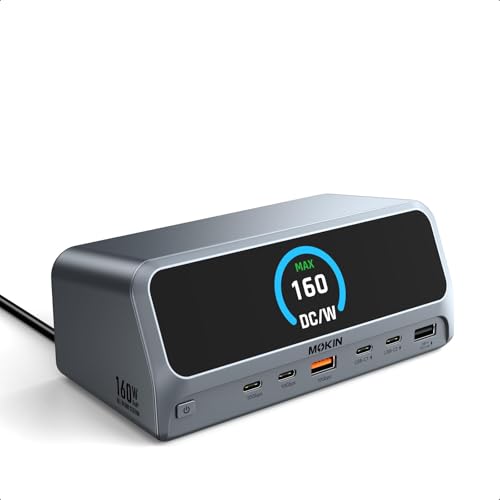
- 160W built-in power with up to 100W laptop charging
- Dual 4K@60Hz HDMI display support on Windows
- LCD status display and physical privacy button
Best For: Clean dual-monitor desks requiring integrated power
Best for Triple 4K Expansion
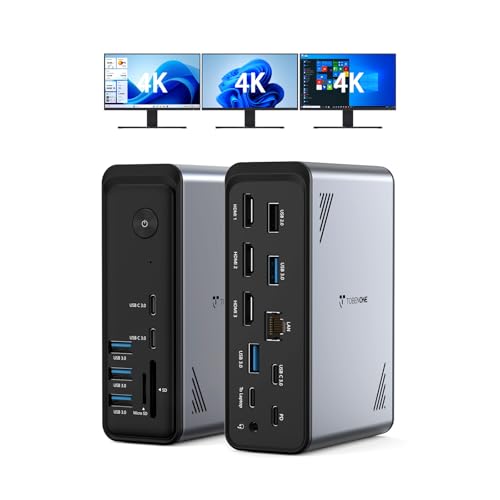
- 18 ports with nine USB connections
- Triple or dual 4K@60Hz display support
- Up to 100W PD, but power supply is separate
Best For: Windows and ChromeOS triple-monitor workstations
Premium Powerhouse
Anker Prime 14-in-1 Dual-Monitor Dock

- 14-in-1 connectivity with dual HDMI, Ethernet, and audio
- 160W total output with high-capacity USB-C charging
- Up to 10Gbps data and dual-display support
Best For: Power users building a well-connected dual-monitor desk
Triple-Screen Workhorse

- Triple-monitor output through two HDMI ports and DisplayPort
- 150W total power with up to 100W laptop charging
- 10Gbps USB-C, Ethernet, card readers, and audio
Best For: Windows or Linux triple-monitor workstations
Compact Everyday Hub

- Portable 8-in-1 design with dual HDMI and card readers
- Up to 85W power pass-through with a suitable charger
- Single 4K/60Hz or dual 4K/30Hz display support
Best For: Everyday USB-C laptop and home-office setups
Best Value Powerhouse

- Includes a 96W adapter with up to 65W laptop charging
- Dual 4K HDMI at 30Hz or single 4K at 60Hz
- Ethernet, SD/TF readers, USB, audio, and 18W USB-C output
Best For: Broad home-office connectivity with an included power adapter
Best for Triple-Display Windows Setups

- Windows triple-display support via dual HDMI and DisplayPort
- Up to 4K at 60Hz with a DP 1.4 source
- 100W PD input, 10Gbps USB-C, Ethernet, and eight USB ports
Best For: Windows multi-monitor workstations with fast peripheral connectivity
Best Premium Monitoring Design

- Dual HDMI supports up to 4K at 60Hz
- 100W laptop PD and 160W total output
- LCD status display with upright space-saving design
Best For: Organized workstations needing high-speed ports and power monitoring
Most Versatile – HODO 18-in-1 Powered Docking Station
For users who need broad connectivity and flexible display support, this powered docking station combines an included 120W adapter with 18 ports. It supports dual or triple displays on compatible Windows laptops, fast USB transfers, wired networking, and simultaneous laptop-and-phone charging.
Best For: Windows users building a multi-monitor workstation with extensive peripheral and card-reader connectivity.
Pros:
- Includes a 120W power adapter and supports up to 30W phone or tablet charging through its additional USB-C PD port.
- Offers dual HDMI plus DisplayPort outputs, including triple-display support on compatible Windows systems and single 8K display support.
- Provides 10Gbps USB ports, 3Gbps SD/TF card transfers, Gigabit Ethernet, audio, and a screen on/off button.
Cons:
- macOS and iPadOS are limited to mirrored displays rather than extended multi-monitor output.
- Requires the included 120W adapter to be connected before using charging and display functions.
- Compatibility depends on a laptop having a full-featured USB-C or Thunderbolt port with DisplayPort support.
This is a strong all-around choice when port variety matters as much as display expansion. Its Windows-focused triple-monitor capability and included power adapter make it particularly practical for demanding desk setups.
Best for Business IT – Dell Pro Dock WD25
The Dell Pro Dock WD25 is a business-oriented powered docking station designed for mainstream Dell AI PCs as well as non-Dell computers. It delivers up to 100W of power, supports up to four high-resolution displays, and adds enterprise-friendly management features alongside wired networking and modern USB connectivity.
Best For: Office users and IT teams that want a manageable dock with broad operating-system support and a three-year limited hardware warranty.
Pros:
- Delivers up to 100W of power to compatible Dell and non-Dell PCs.
- Supports up to four high-resolution displays and includes DisplayPort, HDMI, Ethernet, USB-A, and USB-C connectivity.
- Offers flexible cable routing, a durable USB-C connector, reduced standby power consumption, and recycled-material construction.
Cons:
- Its listed hardware includes six USB ports and ten total ports, fewer than several higher-port-count alternatives.
- Display and feature compatibility varies across Windows, Ubuntu, Red Hat Enterprise Linux, and ChromeOS systems.
- The supplied notes do not identify the exact included power-adapter wattage, although the dock is rated at 130W and provides up to 100W to the laptop.
Choose the WD25 when reliability, manageability, and workplace deployment matter more than maximizing port count. Its broad OS support and quad-display capability make it a sensible office docking solution.
Best Built-In Power – MOKiN LumiNext DD01 Dock
The MOKiN LumiNext DD01 stands out among powered docking stations because its 160W power supply is built into the dock, eliminating the need for a separate external brick. A smart LCD shows connection and power-delivery status, while dual HDMI outputs, fast USB ports, Gigabit Ethernet, and simultaneous device charging support a tidy, capable desk setup.
Best For: Users who want built-in power, dual 4K monitor support, and visible charging or connection status.
Pros:
- Built-in AC power provides 160W total output and up to 100W to the laptop, with charging for additional devices.
- Dual HDMI outputs support 4K at 60Hz with extended or mirrored displays on Windows.
- Includes a 2.26-inch LCD status display, privacy button, 10Gbps USB ports, Gigabit Ethernet, and a two-year warranty.
Cons:
- MacBooks are limited to mirrored content across the two HDMI displays.
- Requires a full-function USB-C or Thunderbolt 3/4 port on the host laptop.
- It provides 13 ports, which may be less suitable for users needing the broadest possible expansion.
The DD01 is a convenient choice for a permanent workstation where fewer cables and clear power feedback are priorities. Its built-in supply and LCD make everyday setup and monitoring easier than with many adapter-based docks.
Best for Triple 4K Expansion – TobenONE 18-in-1 Dock
The TobenONE 18-in-1 is a powered docking station for Windows and ChromeOS laptops that need extensive expansion and up to three 4K displays. It combines nine USB ports with three HDMI outputs, card readers, Ethernet, audio, and 100W power delivery, making it well suited to busy home-office or creative workstations.
Best For: Windows or ChromeOS users who need triple 4K monitor support and many connected peripherals.
Pros:
- Provides 18 ports, including nine USB ports, three HDMI outputs, RJ45 Ethernet, SD and microSD readers, and 3.5mm audio.
- Supports dual or triple 4K displays at 60Hz on compatible systems.
- Offers up to 100W PD charging for the laptop and broad compatibility with Windows and ChromeOS laptops using full-featured USB-C, USB4, or Thunderbolt.
Cons:
- Does not include a power supply; stable operation requires an additional power supply rated above 65W.
- Its triple-monitor design is specifically positioned for Windows and ChromeOS systems, so users should verify compatibility before buying.
- The large number of ports may be more than needed for a simple single-monitor setup.
This dock is compelling for users who want to consolidate many accessories and displays through one connection. The main tradeoff is the need to provide a separate power supply, so budget for that when comparing it with other powered docking stations.
Premium Powerhouse – Anker Prime 14-in-1 Dual-Monitor Dock
If you need powered docking stations for a busy desk setup, the Anker Prime combines extensive connectivity with up to 160W of total output. It supports dual HDMI displays, fast data transfers, Ethernet, and audio, making it a strong option for compatible Windows or ChromeOS laptops.
Best For: Power users who need many ports, dual displays, and high total charging capacity.
Pros:
- 14-in-1 design includes dual HDMI, Ethernet, audio, and multiple USB ports.
- Up to 160W total output, with USB-C charging up to 100W per port and 12W USB-A charging.
- Supports data speeds up to 10Gbps and dual displays up to 2K at 60Hz with a DP 1.4 laptop.
Cons:
- Not compatible with Linux.
- On macOS, both external displays show identical content.
- Does not support a 5120×1440 monitor.
This is the most capable choice of the three for high-port-count workstations and simultaneous charging. Verify your laptop’s DP Alt Mode and Power Delivery support, plus the display limitations, before buying.
Triple-Screen Workhorse – Selore&S-Global 13-in-1 Dock
Among powered docking stations, this 13-in-1 model stands out for triple-monitor support and a 150W DC power design. It pairs two HDMI outputs with DisplayPort, fast USB-C connectivity, card readers, Ethernet, and audio for Windows or Linux multi-screen workflows.
Best For: Windows or Linux users who want three extended displays and substantial dock power.
Pros:
- Supports three monitors through two HDMI ports and DisplayPort.
- 150W total power delivery includes up to 100W for a laptop and 30W for USB-C accessories.
- Offers dual 10Gbps USB-C ports, Gigabit Ethernet, SD/microSD readers, and audio.
- Supports a single 4K display at up to 144Hz with a DP 1.4 connection.
Cons:
- macOS supports screen mirroring only, not an extended desktop.
- 4K at 144Hz is limited to a single monitor; using multiple displays disables other outputs.
- Power allocation changes when the laptop and connected accessories are used simultaneously.
Choose this dock when three-screen productivity matters more than simplicity. Its display modes and power-sharing behavior make it especially important to confirm your laptop, operating system, and monitor arrangement in advance.
Compact Everyday Hub – Anker 8-in-1 Dual-HDMI Dock
This compact Anker hub is one of the more portable powered docking stations for USB-C laptops. It adds dual HDMI, Ethernet, USB-A, and SD/microSD card access while passing through up to 85W of charging when paired with a compatible 100W PD wall charger and USB-C cable.
Best For: Laptop users who want a small, practical hub for charging, displays, networking, and removable storage.
Pros:
- Compact 8-in-1 design adds dual HDMI, Ethernet, USB-A, and SD/microSD readers.
- Supports up to 85W USB-C Power Delivery pass-through.
- Can drive one 4K display at 60Hz or two displays at 4K at 30Hz.
- Supports USB-C, USB4, and Thunderbolt connections on compatible systems.
Cons:
- 100W PD wall charger and USB-C cable are required but not included.
- macOS mirrors the same content on both external monitors.
- Not compatible with Linux.
This is a sensible pick for a lightweight home-office or travel setup rather than a high-output workstation. Its modest size and useful port mix are appealing, but remember to budget for the required charger and cable.
Best Value Powerhouse – NewQ 12-in-1 Dual 4K Dock
For shoppers comparing powered docking stations, the NewQ 12-in-1 model combines a bundled 96W adapter with dual HDMI, wired networking, card readers, USB ports, and audio. It supports dual 4K displays at 30Hz or one 4K display at 60Hz, while providing up to 65W laptop charging and an additional 18W USB-C output.
Best For: Home offices and workstations needing broad connectivity with a power adapter included.
Pros:
- Includes a 96W power adapter and supports up to 65W laptop charging.
- Offers dual 4K HDMI output at 30Hz or single 4K at 60Hz.
- Includes Ethernet, SD/TF readers, four USB-A ports, audio, and 18W USB-C output.
- Supports simultaneous SD and microSD access with transfer speeds up to 104 MB/s.
Cons:
- MacOS does not support triple extended displays.
- Dual-display output is limited to 30Hz at 4K.
The NewQ is a practical choice when you want a powered, feature-rich dock without sourcing a separate charger. Its wide compatibility and storage-card support suit general productivity, though users seeking dual 4K at 60Hz should consider another option.
Best for Triple-Display Windows Setups – LIONWEI 13-in-1 Dock
This LIONWEI model is one of the more versatile powered docking stations for Windows users, pairing dual HDMI with DisplayPort, eight USB ports, Gigabit Ethernet, audio, and 100W Power Delivery. Its USB-C charging input can provide up to 87W to a laptop after the dock’s own power usage.
Best For: Windows users building a multi-monitor desk with fast USB connectivity.
Pros:
- Supports triple-display output on Windows through dual HDMI and DisplayPort.
- HDMI and DisplayPort can support up to 4K at 60Hz with a DP 1.4 source.
- Provides 10Gbps USB-C connectivity plus three USB 3.0 and two USB 2.0 ports.
- Includes Gigabit Ethernet, a combined audio/mic jack, and 100W PD support.
Cons:
- MacOS can extend to only one monitor; additional displays use mirroring.
- The dock uses 13W, leaving up to 87W for laptop charging.
- Triple-display operation is limited to supported Windows systems and source hardware.
With its combination of three display outputs and fast data ports, the LIONWEI is especially appealing for Windows multitaskers. Mac users should view it primarily as a single-extended-display dock because of the stated macOS limitation.
Best Premium Monitoring Design – Selore 13-in-1 LCD Dock
The Selore 13-in-1 is a premium-style powered docking station built around dual 4K HDMI output, 10Gbps USB ports, 100W laptop charging, and a built-in 2.26-inch LCD. Its upright aluminum design and integrated cable help keep a busy desk organized, while the display shows charging and port activity.
Best For: Desk-based users who want high-speed connectivity and visible power-status information.
Pros:
- Supports dual HDMI displays at up to 4K and 60Hz.
- Provides 100W dedicated USB-C PD charging and 160W total output.
- LCD display shows charging status, wattage, and port activity.
- Includes 10Gbps USB ports, Gigabit Ethernet, SD/TF readers, audio, and multiple charging ports.
Cons:
- A 100W PD charger is required for full-speed laptop charging and is sold separately.
- macOS supports only one extended external display; multiple displays mirror.
- Full display support depends on the laptop’s DisplayPort Alt Mode and Power Delivery capabilities.
The Selore stands out for users who value power visibility and a tidy vertical footprint as much as connectivity. It is a strong fit for demanding desk setups, provided you already have—or plan to buy—a suitable 100W charger.
How We Picked These Powered Docking Stations
We selected docks that offer more than basic port expansion, prioritizing models with their own power adapters, useful display connectivity, broad laptop compatibility, and practical port layouts. The lineup includes choices for home offices, hybrid work, creative workflows, and multi-monitor productivity.
We also considered advertised power delivery, monitor support, USB expansion, Ethernet, storage-card connectivity, and whether a dock is better suited to Windows laptops, MacBooks, or mixed-device households. Always verify the manufacturer’s compatibility details before purchase, especially for triple displays and high-resolution output.
Quick Comparison
| Best For | Look For | Typical Advantage |
|---|---|---|
| Everyday office work | Dual HDMI or DisplayPort, Ethernet, USB ports | Simple expansion for one or two monitors |
| Triple-monitor setups | Three display outputs and confirmed OS support | More screen space for demanding workflows |
| High-power laptops | 100W or higher charging capability | Fewer battery-drain concerns under load |
| Photographers and creators | SD or TF readers, fast USB, high-resolution output | Faster file transfers and cleaner desk setups |
| Travel | Compact design and USB-C connectivity | Portable access to essential peripherals |
Key Buying Factors for Powered Docking Stations
Power Delivery and the Included Adapter
Check both the dock’s advertised wattage and the wattage that reaches the laptop after the dock uses some power itself. A 100W or 120W specification may be preferable for performance laptops, while lower-power systems may work well with less. Confirm that the included adapter is rated for the claimed output.
Monitor Compatibility
Count the required displays and check their resolution and refresh rate. Dual 4K support is common among higher-end models, but triple-monitor operation can depend on the laptop’s graphics hardware, USB-C capabilities, DisplayLink software, Thunderbolt support, and operating system. Macs may have different native display limits than Windows PCs.
Ports and Data Speeds
Choose the ports you will actually use: USB-A for older accessories, USB-C for newer drives, Ethernet for stable networking, audio for headsets, and SD or TF slots for removable storage. Do not assume every USB-C port supports the same charging, video, or transfer features.
Compatibility and Setup
Confirm support for your laptop brand and model, USB-C or Thunderbolt generation, operating system, and external monitors. Some docks require drivers or firmware updates, particularly when supporting multiple displays through DisplayLink.
Who Should Buy Which Powered Docking Stations?
Choose a compact 8-in-1 or 12-in-1 model if you need a straightforward home-office setup, occasional travel, or two displays without many specialty accessories. A dock with 100W or more is a better fit for demanding business laptops and users who want one-cable charging.
For designers, analysts, traders, and video editors, prioritize a model built for multiple high-resolution screens, ample USB connectivity, and reliable Ethernet. If you regularly move photos or video, select a dock with SD or TF readers and fast storage support. Finally, buyers using MacBooks or mixed Windows-and-Mac households should treat display compatibility as the deciding factor rather than relying only on the port count.