The best photo printers for scrapbooking make it easy to turn phone pictures into ready-to-use accents, journaling elements, labels, and keepsakes. The right model depends on whether you value true 4×6 photos, compact sticker prints, low running costs, or extra crafting features.
We selected 10 options spanning dye-sublimation, ZINK, and thermal printing technologies, including portable printers for quick layouts and multifunction machines for more ambitious DIY projects.
Best 10 Photo Printers for Scrapbooking Picks for 2026
Best Bundle
Canon SELPHY CP1500 Photo Printer Kit

- Includes 108 sheets and three color cartridges
- Water- and fingerprint-resistant 4x6 prints
- Compact Wi-Fi design for home or travel
Best For: Scrapbookers who want a ready-to-use 4x6 printing bundle
Best Docking Station
KODAK Dock Plus 4x6 Photo Printer

- Docks and charges compatible smartphones
- Creates laminated 4PASS 4x6 prints
- Bluetooth and app-based editing
Best For: Phone-first scrapbookers who want easy desktop printing
Best Multi-User Pick

- Includes 100 sheets and three cartridges
- Connects up to five devices at once
- App adds borders, filters, and image adjustments
Best For: Families and craft groups sharing a printer
Best Peel-and-Stick Pick
Canon Ivy 2 Mini Photo Printer

- 2 x 3-inch ZINK prints
- Peel-and-stick photo paper
- Bluetooth app printing
Best For: Small scrapbook accents and portable decorating
Best Versatile Format Choice
Liene Amber M110 Bluetooth Photo Printer

- Prints 4 x 6 and 3 x 3-inch photos
- Dual paper trays
- Includes sticker paper and cartridges
Best For: Mixed-size scrapbook layouts
Best Scrapbooking Starter Bundle
HP Sprocket 2x3 Instant Photo Printer

- Includes scrapbook accessories
- 2 x 3-inch sticky-back prints
- App filters, frames, and stickers
Best For: Beginners wanting an all-in-one decorating kit
Best All-in-One Pick
Liene PixCut S1 Sticker Printer
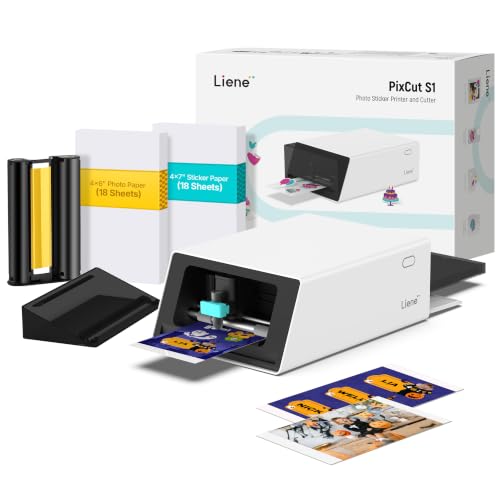
- Prints and cuts stickers in one device
- AI-assisted image extraction and precision cutting
- Water- and scratch-resistant laminated prints
Best For: Custom scrapbook stickers, labels, and photo embellishments
Best Budget-Friendly Portable Pick
KODAK Step Instant Photo Printer

- Portable, lightweight design for crafting on the go
- Peel-and-stick 2-by-3-inch ZINK photos
- App includes filters, borders, stickers, and text
Best For: Simple, portable scrapbook layouts with mini adhesive photos
Best Creative Mini Printer
Liene Pearl N200 Pro Photo Printer

- Compact dye-sublimation printer for vivid mini photos
- Includes 50 adhesive sheets and five cartridges
- AI styles, background removal, and camera-to-print mode
Best For: Creative 2-by-3-inch scrapbook stickers and photo accents
Best Bundle – Canon SELPHY CP1500 Photo Printer Kit
For shoppers comparing photo printers for scrapbooking, this Canon SELPHY CP1500 bundle is a convenient 4×6-inch option with paper, three color cartridges, and a cleaning cloth included. Its dye-sublimation prints are designed to resist water and fingerprints, while Wi-Fi lets you print from compatible smartphones, tablets, or computers.
Best For: Scrapbookers who want a ready-to-use 4×6 photo-printing bundle.
Pros:
- Includes 108 sheets of paper and three full-size color cartridges.
- Produces water-resistant, fingerprint-resistant dye-sublimation prints.
- Compact wireless design suits desks, shelves, and travel.
Cons:
- Limited to a maximum media size of 4×6 inches.
- The bundle is focused on color photo printing rather than general document printing.
This is a practical pick when minimizing extra supply purchases matters. The included consumables and straightforward wireless setup make it especially convenient for scrapbook projects, journaling, events, and gifts.
Best Docking Station – KODAK Dock Plus 4×6 Photo Printer
The KODAK Dock Plus is one of the more convenient photo printers for scrapbooking if you primarily print from a phone. Its integrated dock supports a stable connection and can charge a compatible smartphone while the printer creates laminated 4×6 photos through Bluetooth and the KODAK Photo Printer app.
Best For: Smartphone users who value a desktop dock and simple app-based editing.
Pros:
- Integrated docking station supports charging while printing.
- 4PASS dye-sublimation prints receive a protective lamination layer.
- App supports editing, cropping, and customization before printing.
Cons:
- Designed for 4×6-inch prints rather than multiple scrapbook sizes.
- Requires a power outlet for consistent desktop operation.
- The listed output capacity is 50 sheets.
The Dock Plus makes a strong choice for scrapbookers who keep their photos on a phone and want a straightforward print-and-edit workflow. Its water-, fingerprint-, and fade-resistant finish is useful for pages and albums that will be handled often.
Best Connectivity – Canon SELPHY CP1500 Compact Printer
Among photo printers for scrapbooking, the white Canon SELPHY CP1500 stands out for flexible ways to send photos. It supports Wi-Fi, USB, memory cards, cameras, computers, and smartphones, and its built-in 3.5-inch display lets you review and apply effects before printing.
Best For: Scrapbookers who print from several device types and want an onboard display.
Pros:
- Supports Wi-Fi, USB, memory cards, cameras, computers, and smartphones.
- Built-in 3.5-inch display enables viewing, editing, and filter effects.
- Compact design can be paired with an optional battery back for portability.
- Prints are described as instantly dry, water resistant, and long-lasting.
Cons:
- Maximum media size is 4×6 inches.
- The standard package includes only trial paper and ink supplies.
- The optional battery back is not included.
This model is a good fit for a scrapbook workspace shared by phones, cameras, cards, and computers. Choose it when connection flexibility and on-printer controls matter more than receiving a large supply bundle.
Best Multi-User Pick – Liene M100 4×6 Photo Printer
The Liene M100 is a useful choice among photo printers for scrapbooking when several people need to print from their own devices. Its built-in Wi-Fi hotspot avoids reliance on another network, supports up to five simultaneous connections, and works with an app for borders, filters, brightness adjustments, and other edits.
Best For: Families, craft groups, and scrapbookers sharing one wireless printer.
Pros:
- Package includes 100 sheets of 4×6 paper and three color cartridges.
- Built-in hotspot provides a direct Wi-Fi connection without another network.
- Supports up to five simultaneous device connections.
- Laminated prints resist water, scratches, fingerprints, and fading.
Cons:
- Uses Liene proprietary cartridges.
- Maximum media size is 4×6 inches.
- Users must ensure the cartridge clicks securely into place before printing.
The M100 combines a generous starter supply with sharing-friendly wireless access. It is especially practical for collaborative scrapbook sessions, though buyers should account for its proprietary cartridge system when planning ongoing supply costs.
Best Peel-and-Stick Pick – Canon Ivy 2 Mini Photo Printer
The Canon Ivy 2 is a compact choice for photo printers for scrapbooking, especially when you want small, colorful images that can be placed directly on scrapbook pages. It connects to compatible iOS and Android devices through the Canon Mini Print App and uses ZINK paper without ink cartridges.
Best For: Crafters who want portable 2 x 3-inch sticky-back prints for decorating pages, cards, and other surfaces.
Pros:
- Peel-and-stick backing makes photos easy to position in scrapbook layouts.
- ZINK technology requires no ink cartridges.
- Improved skin tones, contrast, and sharpness compared with the prior IVY model.
- Lightweight design and Bluetooth 5.0 support suit mobile printing.
Cons:
- Prints are limited to a small 2 x 3-inch format.
- The supplied specifications list an initial print time of up to 50 seconds.
- Printing requires compatible mobile devices and the Canon Mini Print App.
The Ivy 2 is a straightforward option for adding quick, adhesive-backed snapshots to scrapbook projects. Its small print size favors accents and captions rather than large feature photos.
Best Versatile Format Choice – Liene Amber M110 Bluetooth Photo Printer
The Liene Amber M110 stands out among photo printers for scrapbooking because it supports both standard 4 x 6-inch photos and 3 x 3-inch sticky-backed prints. Its dye-sublimation system produces laminated, colorful photos, while the included paper and cartridges support a substantial starter supply.
Best For: Scrapbookers who want both larger finished photos and square adhesive prints from one portable printer.
Pros:
- Dual trays accommodate 4 x 6-inch and 3 x 3-inch media.
- Dye-sublimation prints have a laminated surface designed to resist water, scratches, fingerprints, and fading.
- Includes 60 sheets of 4 x 6 paper, 20 sheets of 3-inch square sticker paper, and two cartridges.
- The app supports borders, filters, brightness and contrast adjustments, and other customization.
Cons:
- At 2.9 pounds, it is less lightweight than pocket-sized mini printers.
- It uses only compatible Liene 4 x 6 and 3 x 3 cartridges.
- Bluetooth pairing and printing require a compatible device and app.
For scrapbookers who work with varied layouts, the M110 offers more flexibility than printers restricted to mini prints. The two paper sizes let you combine full-size photos with square stickers in the same project.
Best Scrapbooking Starter Bundle – HP Sprocket 2×3 Instant Photo Printer
HP Sprocket Portable 2x3 Instant Color Photo Printer (Blush Pink) Starter Bundle
Check Price On AmazonThe HP Sprocket starter bundle is a fun entry point for photo printers for scrapbooking, combining a pocket-size 2 x 3-inch ZINK printer with paper and decorating supplies. The HP app adds filters, frames, stickers, borders, and emojis before printing from a smartphone or social media account.
Best For: Beginners and families who want a ready-to-use scrapbook decorating kit with creative accessories included.
Pros:
- Includes 20 sheets of paper, a case, markers, an album, sticker sets, frames, and decorative stickers.
- ZINK paper has a glossy sticky-back surface and needs no toner or ribbon.
- HP app tools offer filters, frames, stickers, borders, and emojis.
- Compact 2 x 3-inch printer supports Bluetooth smartphone printing.
Cons:
- Prints are limited to 2 x 3 inches.
- The bundle’s included paper supply is limited to 20 sheets.
- Printing is designed around compatible smartphones and the HP app.
This bundle is particularly convenient if you want more than the printer itself: the included accessories can help start a scrapbook immediately. Its small sticky-back prints work best as accents, labels, and decorative snapshots.
Best All-in-One Pick – Liene PixCut S1 Sticker Printer
For scrapbookers who want more than basic snapshots, the Liene PixCut S1 combines photo printing and precision cutting in one device. It uses thermal dye-sublimation technology to produce 300 dpi color prints, then turns photos into custom stickers, labels, and decorative pieces through the app.
Best For: Scrapbookers who want an all-in-one printer and cutter for custom stickers, labels, and photo embellishments.
Pros:
- Prints and cuts in one streamlined workflow.
- AI image extraction helps create precise subject-shaped stickers.
- Four-layer printing automatically laminates stickers for water, scratch, and smudge resistance.
- The app includes templates, fonts, images, and editing tools without a subscription.
Cons:
- At 6.2 pounds, it is less portable than mini photo printers.
- Its cutting and creative features may be more than needed for simple photo-only scrapbooking.
The PixCut S1 is a strong choice when scrapbook projects involve custom shapes and durable stickers as much as ordinary photos. Its larger size is the main tradeoff for the added cutting capability.
Best Budget-Friendly Portable Pick – KODAK Step Instant Photo Printer
The KODAK Step is a compact option for scrapbookers who want quick, peel-and-stick photo prints. Its ZINK 2-by-3-inch paper has embedded dye crystals, so there is no ink cartridge to replace, and the Bluetooth app adds filters, borders, stickers, text, and collage tools.
Best For: Casual scrapbookers who value portability, simple wireless printing, and adhesive-backed mini photos.
Pros:
- Lightweight, palm-sized design is easy to take to craft sessions.
- Sticky-back 2-by-3-inch prints can be placed directly in scrapbook layouts.
- ZINK prints are designed to resist moisture, rips, tears, and smudges.
- Works with iOS and Android devices through Bluetooth or NFC.
Cons:
- Its 2-by-3-inch maximum media size limits photo scale.
- A full charge is rated for about 25 photos, which may be limiting for larger projects.
- Prints at about one page per minute, so it is not intended for high-volume printing.
Among photo printers for scrapbooking, the KODAK Step stands out for convenience and low carrying weight. Choose it when small adhesive photos and on-the-go crafting matter more than larger prints or advanced cutting.
Best Creative Mini Printer – Liene Pearl N200 Pro Photo Printer
The Liene Pearl N200 Pro is a compact dye-sublimation printer for scrapbookers who prefer small, adhesive-backed photos with more creative editing options. Its 2-by-3-inch prints pair with Bluetooth connectivity, AI styling and background removal in the app, and an optional shoot-and-print mode using the built-in camera.
Best For: Creative scrapbookers who want portable 2-by-3-inch sticker photos, AI effects, and quick camera-to-print workflows.
Pros:
- Dye-sublimation printing is designed to deliver sharp resolution and vibrant color.
- Includes 50 sheets of 2-by-3-inch adhesive paper and five cartridges.
- App offers artistic styles, background removal, frames, watermarks, timestamps, and stickers.
- Supports quick Bluetooth pairing and multi-device printing.
Cons:
- Its 2-by-3-inch format is suited to accents and small photos rather than full-page layouts.
- One full charge prints up to 27 stickers, so extended sessions may require recharging.
- It is designed for smartphone-based printing and does not offer larger media sizes.
The N200 Pro offers a useful balance of portability and creative control. Its included adhesive supplies make it convenient to start, while the small format keeps it best suited to scrapbook accents, captions, and clustered photo arrangements.
How We Picked the Best Photo Printers for Scrapbooking
We focused on features that matter during real scrapbook projects: print size, color quality, portability, connection options, media availability, and ease of use. The selection includes both 4×6-inch printers for traditional photo layouts and smaller sticker printers for planners, cards, borders, and embellishments.
We also considered bundled paper and ink, since the advertised printer price does not tell the whole cost-per-print story. Models with dedicated mobile apps, Bluetooth or wireless connectivity, and simple paper loading received priority for convenient crafting sessions.
Quick Comparison
| Printer type | Best suited to | Main advantage |
|---|---|---|
| 4×6 dye-sublimation | Traditional scrapbook photos | Detailed, durable color prints |
| 2×3 ZINK or mini printers | Small layouts and journaling | Compact, often sticker-backed output |
| Sticker printers | Labels and decorative elements | Creative adhesive media |
| Printer-cutter combinations | Advanced DIY projects | Prints and cuts custom shapes |
Key Buying Factors for Photo Printers for Scrapbooking
Print Size and Resolution
Choose a 4×6 printer if photos are the main feature of your pages. Smaller 2×3-inch prints work better for collages, pockets, captions, and compact planners. Check the app’s editing controls and the printer’s stated resolution if sharp faces and fine details are important.
Print Technology and Durability
Dye-sublimation printers generally provide smoother, more photographic results and commonly apply a protective finish. ZINK and other thermal systems avoid traditional ink cartridges, but their output may have a different color and texture. For archival albums, confirm the manufacturer’s claims about water, smudge, and fade resistance.
Media Costs and Availability
Look beyond included starter paper. Compare refill prices, cartridge bundles, and whether each print requires a matched ribbon or cartridge. Sticker-backed sheets can cost more but may save time when you want adhesive photos without separate glue or tape.
Connectivity and Portability
Bluetooth models are convenient for phone-based crafting, while Wi-Fi printers can offer broader household access. A compact battery-powered design suits crop days and travel; a larger desktop model is usually more practical for repeated 4×6 printing at home.
Who Should Buy Which Photo Printers for Scrapbooking?
Choose a Canon SELPHY CP1500 or KODAK Dock Plus if you want classic 4×6 scrapbook photos with a more traditional photo-printer format. These are strong choices for family albums, milestone pages, and larger images.
Choose a Liene M100 when you want a portable 4×6 option with bundled supplies. It is a practical middle ground for crafters who need larger prints without committing to a full-size home printer.
Choose a Canon Ivy 2, HP Sprocket, KODAK Step, or Liene Pearl N200 Pro for small adhesive photos, quick decorations, and mobile journaling. These models fit neatly into compact crafting kits.
Choose the Liene PixCut S1 if your projects involve custom stickers, labels, or cut shapes as well as photos. Its extra cutting capability makes it the most craft-focused option, though it may be more equipment than casual scrapbookers need.