The best smart home hubs with touchscreen displays combine voice control with an at-a-glance interface for routines, calendars, cameras, media, and connected devices. The right model depends on whether you prioritize family organization, broad compatibility, security, or wall-mounted control.
We compared these 10 options by display size, platform support, smart-home connectivity, installation style, and everyday usability so you can choose a hub that fits your home instead of adding another complicated gadget.
Best 10 Smart Home Hubs with Touchscreen Displays Picks for 2026
Family Command Center

- 15.6-inch Full HD display with customizable widgets
- Built-in Fire TV and video calling
- Voice and touchscreen smart-home controls
Best For: Families wanting organization, entertainment, and smart-home control on one large display
Family Planner Pick

- Syncs multiple major calendar services
- Includes chores, meal planning, lists, and weather
- No monthly subscription; wall or desk placement
Best For: Families prioritizing schedules, chores, and meal planning
Dedicated Control Panel

- Customizable 8-inch smart-home dashboard
- Supports Wi-Fi, Zigbee, Matter, Thread, and more
- Controls devices, cameras, routines, and security
Best For: Alexa users wanting a dedicated wall-mounted control center
Built-In Wall Control
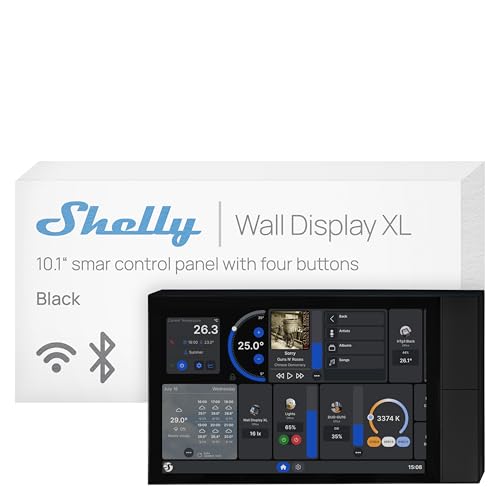
- 10.1-inch in-wall touchscreen with built-in relay
- Four customizable buttons for appliance control
- Works with Home Assistant, Alexa, Google, and HomeKit
Best For: Permanent, automation-focused installations requiring physical controls
Best for Eufy Security Monitoring
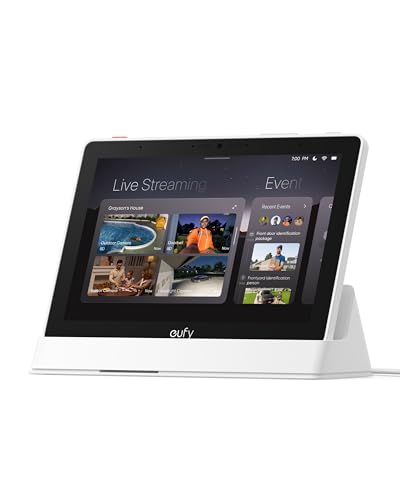
- Automatic live feeds and voice alerts
- Four-camera simultaneous viewing
- Local playback and HomeBase 3 reports
Best For: Eufy households prioritizing touchscreen security monitoring
Best for Google Assistant Households

- 10-inch HD touchscreen
- Built-in 6.5 MP Nest Cam
- 50W stereo audio system
Best For: Google Assistant users wanting a large display with camera and audio
Best for Smart Life and Zigbee Devices
MOES 5-Inch Zigbee Control Panel

- Built-in Zigbee gateway
- Alexa voice control
- Wired or wireless installation
Best For: Smart Life users managing Zigbee devices from one compact panel
Family Planning Powerhouse
Nori 15.6-inch Family Calendar Hub

- 15.6-inch shared touchscreen calendar
- Routines, chores, rewards, and meal plans
- Hub, app, and web access
Best For: Families organizing schedules, chores, and meals in one visible place
Connected Home Control

- 4.7-inch touchscreen control panel
- Security, cameras, thermostat, and energy tools
- Supports saved webpages and media access
Best For: Users wanting compact smart-home monitoring and device control
Everyday Voice Assistant

- 7-inch touchscreen with Google Assistant
- Controls compatible devices by voice or app
- Supports YouTube, Spotify, photos, and reminders
Best For: Households seeking general-purpose voice control and entertainment
Family Command Center – Amazon Echo Show 15
The Amazon Echo Show 15 is a strong choice for shoppers comparing smart home hubs with touchscreen displays and wanting one large, versatile screen for the kitchen. Its 15.6-inch Full HD display combines family organization, smart-home controls, video calling, photo slideshows, and built-in Fire TV.
Best For: Families who want a large wall-style display for calendars, entertainment, smart-home control, and video calls.
Pros:
- Large 15.6-inch Full HD screen with customizable widgets.
- Built-in Fire TV supports services including Prime Video, Netflix, YouTube, and Apple TV.
- Smart-home dashboard supports voice or touchscreen controls and camera feeds.
- Centered auto-framing camera includes a privacy shutter and mic/camera-off controls.
Cons:
- Its large screen may require more wall or counter space.
- Some entertainment services may require subscriptions.
- Fire TV remote and other features add complexity beyond basic home control.
The Echo Show 15 stands out when organization and entertainment matter as much as automation. It is less focused than a dedicated control panel, but its expansive display makes it a practical household information hub.
Family Planner Pick – 15.6-Inch Digital Calendar
This 15.6-inch digital calendar is a practical option among smart home hubs with touchscreen displays for households focused on schedules and routines. It combines calendar syncing, chores, meal planning, weather, custom lists, and photo display without a monthly subscription.
Best For: Busy families, students, and professionals who need a shared schedule and task organizer.
Pros:
- Syncs with Google, iCloud, Outlook, Cozi, and Yahoo calendars.
- Includes chore tracking, color-coded responsibilities, and star-based task progress.
- Supports weekly meal plans, custom checklists, weather, and photo slideshows.
- Can sit on a desk or mount on a wall, with scheduled sleep and wake modes.
Cons:
- Its primary focus is family organization rather than broad smart-device control.
- Requires Wi-Fi for calendar synchronization.
- The supplied notes do not identify compatibility with specific smart-home ecosystems.
If the goal is keeping everyone aligned rather than controlling lights and sensors, this calendar offers a focused touchscreen solution. Its no-subscription design and flexible placement make it especially suitable for shared household spaces.
Dedicated Control Panel – Amazon Echo Hub
The Amazon Echo Hub is designed specifically for shoppers seeking smart home hubs with touchscreen displays that keep device controls easily accessible. Its customizable dashboard can organize devices, cameras, routines, security controls, and media in one wall-mounted interface.
Best For: Alexa households that want a dedicated touchscreen for centralized smart-home and security control.
Pros:
- Customizable dashboard lets users arrange sections and resize controls.
- Built-in support for Wi-Fi, Bluetooth, Zigbee, Matter, Sidewalk, and Thread devices.
- Can view cameras, activate routines, and manage compatible security systems.
- Supports wall mounting and optional tabletop placement.
Cons:
- Wall pass-through hardware, Power over Ethernet, and tabletop stands are sold separately.
- Some Ring features require an Alexa+ and compatible Ring subscription.
- Its 8-inch display is smaller than the larger organization-focused alternatives.
The Echo Hub is the most purpose-built option in this group for everyday smart-home management. Its broad device compatibility and customizable layout make it a good fit for homes already using Alexa-compatible equipment.
Built-In Wall Control – Shelly Wall Display XL
The Shelly Wall Display XL is a compelling choice among smart home hubs with touchscreen displays for permanent in-wall installation. Its 10.1-inch touchscreen, built-in 5A relay, four customizable buttons, and support for Shelly Smart Control or Home Assistant create a hands-on control point for connected devices.
Best For: Homeowners and integrators wanting an installed control panel for lights, appliances, automations, and audio.
Pros:
- 10.1-inch touchscreen installs in a standard electrical wall box.
- Built-in relay and four buttons can control lights, fans, heaters, and other appliances.
- Works with Shelly Smart Control, Home Assistant, Alexa, Google, and HomeKit.
- Can control Bluetooth or Sonos audio and supports remote management and scenes.
Cons:
- Neutral wire is required for installation.
- Installation is more involved than using a portable tabletop display.
- The built-in relay is rated for 5A, which may limit certain loads.
This display is best viewed as a permanent smart-home control station rather than a general-purpose family tablet. Its relay, physical buttons, and broad platform support make it particularly useful for structured installations and automation-focused rooms.
Best for Eufy Security Monitoring – 8-Inch E10 Smart Display
The eufy Smart Display E10 is one of the more security-focused smart home hubs with touchscreen displays. Its 8-inch screen is designed for quick access to live camera feeds, alerts, recordings, and connected Eufy security events.
Best For: Eufy households that want a dedicated touchscreen for monitoring cameras, doorbells, and other security activity.
Pros:
- Automatically displays live video and voice alerts when supported doorbell, door, or camera activity occurs.
- Can show four simultaneous live feeds for at-a-glance property monitoring.
- Supports local event storage, daily reports, and facial and package recognition through HomeBase 3.
- Includes a wall mount, charging station, and charging cable.
Cons:
- Its most notable features are centered on the Eufy security ecosystem.
- The supplied notes do not specify broad compatibility with third-party smart-home platforms.
The E10 makes the most sense when security monitoring is the priority. The large touchscreen, automatic alerts, and local playback give it a practical role as a dedicated home-security control point rather than a general-purpose smart display.
Best for Google Assistant Households – Nest Hub Max Smart Display
The Google Nest Hub Max combines a 10-inch HD touchscreen with Google Assistant and a built-in Nest Cam. For shoppers comparing smart home hubs with touchscreen displays, it offers a larger screen for managing compatible devices while also supporting communication, camera viewing, and entertainment.
Best For: Google Assistant users who want a large smart display with an integrated camera and powerful stereo audio.
Pros:
- 10-inch, 1280-by-800 HD touchscreen provides a roomy interface.
- Built-in 6.5 MP Nest Cam supports video capture and staying in touch.
- Compatible with smart-home devices and includes Bluetooth connectivity.
- Stereo speakers include a 30W subwoofer with 50W total output.
Cons:
- The supplied information identifies it as a first-generation model.
- The notes do not specify the full range of compatible smart-home device brands.
The Nest Hub Max is a strong fit for buyers who value screen size, camera functionality, and audio in one device. It is especially appealing if your home already relies on Google Assistant and compatible smart-home products.
Best for Smart Life and Zigbee Devices – MOES 5-Inch Zigbee Control Panel
The MOES Smart Home Control Panel is a compact option among smart home hubs with touchscreen displays. It combines a 5-inch touch interface, built-in Alexa, and an integrated Zigbee gateway for controlling compatible Smart Life devices without requiring a separate gateway.
Best For: Smart Life users who want centralized control of Zigbee-compatible lights, switches, sockets, cameras, and locks.
Pros:
- Built-in Zigbee hub can replace a separate gateway for compatible devices.
- Alexa enables hands-free control of devices, scenes, and voice skills.
- 5-inch full-touch display provides direct control from the panel.
- Supports wired and wireless networking plus Type-C or circuit-connected power.
Cons:
- The supplied notes describe compatibility primarily around Smart Life devices.
- The 5-inch screen is smaller than the displays on the other products in this roundup.
The MOES panel is a practical choice when you are building around Smart Life and Zigbee products. Its smaller footprint and flexible installation options suit users who want a dedicated control point without adding a standalone Zigbee gateway.
Family Planning Powerhouse – Nori 15.6-inch Family Calendar Hub
The Nori is a practical choice for households comparing smart home hubs with touchscreen displays for family organization. Its large 15.6-inch screen brings shared calendars, routines, chores, meal plans, and shopping lists into one central view, with desk- or wall-mounting options.
Best For: Families that want a highly visible command center for schedules, chores, routines, and meal planning.
Pros:
- Combines Google, iCloud, and Outlook calendars in a color-coded touchscreen view.
- Supports kid-friendly routines, task tracking, and rewards.
- Includes meal planning, recipes, nutrition details, and shared shopping lists.
- Works across the hub, app, and web, with core family features requiring no subscription.
Cons:
- The 15.6-inch design takes more wall or desk space than compact control panels.
- AI features are optional rather than entirely included.
Choose the Nori when family coordination matters more than traditional smart-home device control. Its standout advantage is the roomy, shared planning interface that makes everyday responsibilities easy to see and update.
Connected Home Control – SONOFF NSPanel Pro 120
The SONOFF NSPanel Pro 120 suits shoppers seeking smart home hubs with touchscreen displays that focus on direct device control and monitoring. Its 4.7-inch screen can manage lighting and thermostats, show compatible camera feeds, track energy use, and provide selected web access.
Best For: Smart-home users who want a compact wall-style control panel with security, camera, thermostat, and energy-monitoring functions.
Pros:
- Offers one-tap control through a 4.7-inch touchscreen.
- Supports security modes with sensor-triggered alarms and phone notifications.
- Tracks daily energy consumption for compatible devices over a week.
- Can display live feeds from four supported camera types and save webpages for quick access.
Cons:
- The smaller display is less suited to detailed family planning or media viewing than larger hubs.
- Camera viewing and energy tracking depend on compatible devices and functions.
The NSPanel Pro 120 is the more control-oriented option in this roundup. It makes sense for a connected home where security status, cameras, energy information, and everyday controls need to be accessible from one compact screen.
Everyday Voice Assistant – Google Nest Hub 1st Gen
The first-generation Google Nest Hub is a straightforward option among smart home hubs with touchscreen displays, combining a 7-inch screen with Google Assistant voice control. It displays weather, calendars, photos, and videos while supporting compatible lights, cameras, thermostats, and other devices over Wi-Fi.
Best For: Households that want an accessible smart display for voice commands, entertainment, reminders, and basic smart-home control.
Pros:
- Provides a 7-inch, 1024×600 touchscreen for calendars, weather, photos, and video.
- Google Assistant enables hands-free control, reminders, questions, and routines.
- Works with more than 200 devices from over 50 brands, according to the supplied product details.
- Supports YouTube, Spotify, Pandora, Google Photos, Wi-Fi, and Bluetooth.
Cons:
- It is a first-generation model rather than a newer Nest Hub generation.
- Its display and feature set are less specialized for family planning or advanced home monitoring.
The Nest Hub is a balanced pick for buyers who want a familiar Google Assistant experience with visual information and entertainment. It is best suited to general-purpose use rather than dedicated household task management or security control.
How We Picked the Best Smart Home Hubs with Touchscreen Displays
We focused on hubs that pair a visible touchscreen with meaningful smart-home functions rather than simple voice assistants or standalone tablets. The selection includes countertop displays, wall-mounted control panels, family calendars, and dedicated automation hubs. We considered screen size and resolution, voice-assistant support, compatibility with major device ecosystems, Zigbee or Wi-Fi connectivity, camera and security features, media playback, subscription requirements, and installation needs.
Because these products serve different purposes, there is no single winner for every household. A large display may be ideal for schedules and recipes, while a smaller panel can be better for lighting scenes and room-by-room control.
Quick Comparison
- Best for large-screen organization: Choose a 15.6-inch display if calendars, chores, meal planning, and family information are priorities.
- Best for Alexa homes: Amazon’s Echo displays and Echo Hub provide familiar Alexa control and broad device compatibility.
- Best for Google households: Nest Hub models integrate naturally with Google Assistant, YouTube, Spotify, and compatible smart-home devices.
- Best for wall control: Shelly, MOES, and SONOFF panels are designed for more permanent, centralized installation.
- Best for security-focused use: A hub with camera viewing, monitoring, or security integrations can reduce the need to open separate apps.
Key Buying Factors for Smart Home Hubs with Touchscreen Displays
Platform and Device Compatibility
Check whether the hub supports the ecosystem already in your home, such as Alexa, Google Assistant, Zigbee, or Wi-Fi devices. Compatibility can matter more than screen quality because a beautiful panel is less useful if it cannot control your lights, locks, sensors, or thermostats.
Display Size and Placement
Large 15.6-inch screens work well in kitchens, offices, and shared family spaces. Seven- to 10-inch displays take up less room and are often better for bedside tables, counters, or wall panels. Confirm viewing angles, mounting hardware, power requirements, and cable routing before buying.
Control Features and Privacy
Look for customizable dashboards, routines, physical controls, camera support, microphone or camera switches, and clear privacy settings. If the hub will be used for family schedules, also verify whether calendars, chore tools, and planning features require a subscription.
Long-Term Usefulness
Consider software updates, support for newer standards, app quality, and whether the manufacturer has a reliable smart-home ecosystem. A hub that supports only one narrow function may be inexpensive but less adaptable as your setup grows.
Who Should Buy Which Smart Home Hubs with Touchscreen Displays?
Families who want a shared command center should favor a large digital calendar or Echo Show-style display. Alexa users seeking flexible voice and touchscreen control should compare the Echo Show 15 with the newer Echo Hub. Google users will generally find Nest Hub models the simplest match for their existing services.
Choose Shelly, MOES, or SONOFF when permanent room control, Zigbee connectivity, energy information, or automation scenes matter more than entertainment. Security-minded buyers should prioritize camera and monitoring integrations, while shoppers who want the lowest-complexity setup should choose a display that works with the devices they already own. Before ordering, map your current ecosystem and decide whether you need a family organizer, a media display, or a dedicated automation panel.