The best compact smart home hubs make it easier to connect sensors, lights, remotes, and appliances without filling your home with extra hardware. The right choice depends on the devices you already own, your preferred voice assistant, and the wireless standards you need.
We compared 10 small hubs across compatibility, automation features, connectivity, setup requirements, and everyday control so you can find a practical fit for your smart home.
Best 10 Compact Smart Home Hubs Picks for 2026
Best Matter and Zigbee Hub

- Matter and Zigbee support
- SmartThings, Alexa, and Google Assistant compatibility
- Local automations with Wi-Fi or Ethernet
Best For: Matter- and Zigbee-focused SmartThings homes
Best Tapo Ecosystem Hub

- Connects up to 64 Tapo devices
- Low-power wireless link for sensors and controls
- Built-in chime and up-to-90 dB siren
Best For: Tapo sensor and switch ecosystems
Best Lighting-Focused Hub

- Controls up to 75 Caseta devices
- Integrates with Alexa, Apple HomeKit, and Google Assistant
- Clear Connect technology avoids Wi-Fi congestion
Best For: Lutron Caseta lighting systems
Best Advanced Local Automation Hub

- Aqara Zigbee, Thread, and Matter bridge support
- Local automations with IR control
- PoE, dual-band Wi-Fi, and encrypted storage
Best For: Advanced Aqara automation and Matter integration
Long-Range Pick

- Advertised 2,034-foot maximum range
- Compact wired design
- Voice control and motion alerts
Best For: YoLink users prioritizing range and simple setup
IR Control Pick

- Supports up to 128 Aqara Zigbee devices
- Built-in 360-degree IR control
- Works with major voice platforms
Best For: Aqara users adding appliance control and automation
Modern Protocol Pick
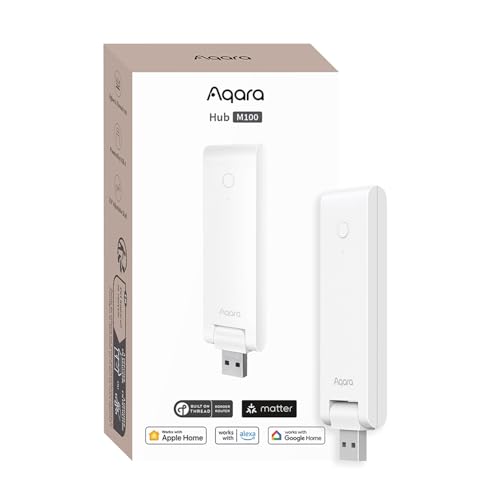
- Matter bridge with Zigbee and Thread support
- Local automation for faster response
- Flexible USB-A-powered placement
Best For: Newer Matter and Thread smart-home setups
Best Budget IR Bridge
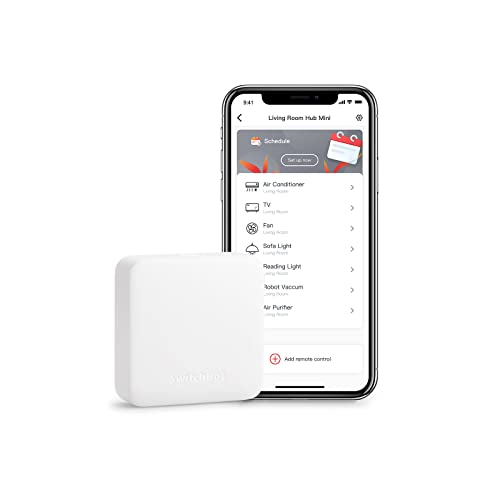
- Learns existing infrared remotes quickly
- Voice control with major assistants
- Compact USB-powered design
Best For: Basic TV, air-conditioner, and SwitchBot control
Best Local Automation Hub

- Local processing can work during internet outages
- Supports Zigbee, Matter, Thread, and Ethernet
- Integrates with 1,000+ brands without a subscription
Best For: Multi-brand homes needing flexible local automation
Best All-in-One Display Hub

- Built-in screen shows home conditions
- Matter bridge with major smart-home platforms
- Dial and buttons simplify hands-on control
Best For: SwitchBot users wanting sensors, scenes, and IR control
Best Matter and Zigbee Hub – Aeotec Smart Home Hub 2
For shoppers comparing compact smart home hubs, the Aeotec Smart Home Hub 2 is a flexible SmartThings-based option for Matter and Zigbee devices. It connects over Wi-Fi or Ethernet and supports local automations, but it does not support Z-Wave.
Best For: Homes building a Matter- and Zigbee-focused SmartThings system.
Pros:
- Supports Matter and Zigbee devices across lighting, sensors, switches, thermostats, and more.
- Works with the SmartThings app, Alexa, and Google Assistant.
- Local automation capability can keep some routines running during temporary internet outages.
- Offers both Wi-Fi and Ethernet setup.
Cons:
- Z-Wave devices are not supported.
- Some advanced features depend on compatible devices and the SmartThings ecosystem.
The Aeotec hub is a strong choice when protocol flexibility and SmartThings integration matter most. Verify that your existing devices use Matter or Zigbee before buying.
Best Tapo Ecosystem Hub – Tapo Smart Hub H100
The Tapo Smart Hub H100 is one of the more focused compact smart home hubs, linking Tapo sensors, switches, and buttons through a low-power wireless connection. It requires a 2.4GHz Wi-Fi network and is designed primarily for Tapo devices.
Best For: Tapo users who want longer-range sensor connections, automation triggers, and an integrated siren.
Pros:
- Supports up to 64 Tapo devices per hub.
- Low-power connectivity can help extend compatible device battery life.
- Offers a claimed maximum range of up to 30 meters, depending on conditions.
- Built-in chime and siren can support alerts from compatible sensors.
Cons:
- Requires a 2.4GHz Wi-Fi connection.
- Cannot directly connect to Tapo smart plugs or smart lighting according to the supplied notes.
- Compatibility is centered on Tapo sensors, switches, and buttons.
The H100 makes sense as the control point for a Tapo-centered setup rather than as a universal smart home hub. Check device compatibility carefully if you use products from multiple brands.
Best Lighting-Focused Hub – Lutron Caseta Smart Hub
The Lutron Caseta Smart Hub is a compact smart home hub built around Lutron Caseta lighting. Its Clear Connect technology is designed not to compete with Wi-Fi-connected devices, while integrations extend to Alexa, Apple HomeKit, Google Assistant, Ring, Serena shades, and Sonos.
Best For: Households expanding a Lutron Caseta lighting system with voice and smart-home integrations.
Pros:
- Supports up to 75 Caseta devices.
- Works with Alexa, Apple HomeKit, Google Assistant, Ring, Serena shades, and Sonos.
- Clear Connect technology avoids competing with Wi-Fi-connected devices.
- Setup requires connecting the hub to a router and using the Lutron app.
Cons:
- Caseta dimmers and switches are sold separately.
- Its primary focus is Lutron Caseta devices rather than broad multi-protocol support.
- It requires a wired connection to your Wi-Fi router.
This hub is a practical pick for reliable Caseta lighting control and broad platform compatibility. It is less suitable if you need a general-purpose Matter, Zigbee, or Z-Wave controller.
Best Advanced Local Automation Hub – Aqara Smart Home Hub M3
The Aqara Smart Home Hub M3 is a compact smart home hub for advanced automation, combining Aqara Zigbee and Thread support with Matter bridging, local processing, and a built-in IR blaster. It offers dual-band Wi-Fi, Ethernet with PoE, encrypted local storage, and no microphone or camera.
Best For: Aqara users who want local automations, Matter integration, Thread support, and IR control.
Pros:
- Supports Aqara Zigbee devices, Thread devices, and advanced Matter bridging.
- Edge Hub design prioritizes local control and automation.
- 360-degree IR blaster can control compatible traditional devices and expose an air conditioner to Matter.
- Offers dual-band Wi-Fi, PoE, USB-C power options, and encrypted local storage.
Cons:
- Third-party Zigbee devices are not supported; Zigbee capacity applies to Aqara devices.
- A 2A USB power adapter is not included.
- Some cloud notifications and Matter behavior still depend on internet or integration-app support.
The M3 is the most feature-rich option here for users invested in Aqara and local automation. Its broader capabilities are valuable, but buyers should confirm device compatibility and plan placement near the router.
Long-Range Pick – YoLink YS1603 Hub
For shoppers comparing compact smart home hubs, the YoLink YS1603 is a straightforward wired option with a small footprint and an advertised maximum range of 2,034 feet. It supports smartphone-compatible control, voice control, and motion alerts.
Best For: Users who want a simple hub with extended range for YoLink-connected devices.
Pros:
- Compact 4.33-by-4.33-by-1.06-inch design
- Advertised maximum range of 2,034 feet
- Supports voice control and motion alerts
- Lightweight at 0.19 kg
Cons:
- Wired connectivity limits placement flexibility
- This regular version does not include battery backup
The YS1603 emphasizes range and simplicity rather than a broad list of ecosystem integrations. Confirm that your existing devices use the YoLink platform before choosing it.
IR Control Pick – Aqara Smart Hub M2
The Aqara Smart Hub M2 is a compact smart home hub for Aqara Zigbee devices, with built-in 360-degree infrared control for compatible TVs, fans, and air conditioners. It also offers Ethernet connectivity, USB power, and support for Alexa, Google Assistant, Apple HomeKit, and IFTTT.
Best For: Aqara households that want IR appliance control and broad smart-home platform compatibility.
Pros:
- Connects with up to 128 Aqara Zigbee devices
- Controls compatible IR appliances from anywhere in the room
- Supports Alexa, Google Assistant, Apple HomeKit, and IFTTT
- Includes Ethernet for a more stable wired connection
Cons:
- Requires a 2.4 GHz Wi-Fi network
- Supports Aqara Zigbee child devices, not third-party Zigbee devices
- Does not support Aqara Thread devices
The M2 is more versatile than a basic bridge because it combines Aqara automation, alarm functions, and IR control. Its device restrictions make ecosystem compatibility an important pre-purchase check.
Modern Protocol Pick – Aqara Smart Hub M100
The Aqara Smart Hub M100 is a compact smart home hub built around Matter bridging, Zigbee, Thread, and 2.4 GHz Wi-Fi 6. It supports local automation for Zigbee and Matter devices, while its adjustable shaft and USB-A power connection make placement flexible.
Best For: Users building a newer Matter- and Thread-based system around Aqara devices.
Pros:
- Supports Aqara Zigbee and Thread devices
- Acts as a Matter bridge for compatible ecosystems
- Can run Zigbee and Matter automations locally
- Adjustable shaft and USB-A power support flexible placement
Cons:
- Supports up to 20 Aqara Zigbee and 20 Thread devices
- Does not support third-party Zigbee devices
- 5V/0.5A power adapter is required but not included
The M100 is a forward-looking choice for shoppers who value Matter and Thread support, local response, and flexible installation. Check the required hub and device compatibility before mixing platforms.
Best Budget IR Bridge – SwitchBot Hub Mini
For shoppers comparing compact smart home hubs, the SwitchBot Hub Mini is a straightforward way to connect infrared appliances and SwitchBot devices to Wi-Fi. Its small, USB-powered design and guided setup make it practical for basic remote control and voice-assistant routines.
Best For: Small spaces and households that mainly want app or voice control for TVs, air conditioners, and other infrared appliances.
Pros:
- Smart learning can mimic an existing remote in about five seconds.
- Controls multiple infrared appliances from one SwitchBot app.
- Works with Alexa, Google Assistant, Siri, and IFTTT.
- Compact, portable, USB-powered design.
Cons:
- Requires a 2.4GHz Wi-Fi connection; 5GHz Wi-Fi is not supported.
- Infrared performance can be affected by obstructions or poor line of sight.
The Hub Mini is a good entry point when your smart-home needs center on infrared control rather than advanced multi-protocol automation. It offers useful basics in a small package, but placement and Wi-Fi compatibility matter.
Best Local Automation Hub – Homey Pro mini
The Homey Pro mini is one of the more capable compact smart home hubs for shoppers who want local automation and broad device compatibility. It supports Zigbee, Matter, Thread, and Ethernet out of the box, while Homey Flow adds room for customized routines.
Best For: Users building a multi-brand smart home who want local processing, flexible automations, and no required subscription.
Pros:
- Processes data locally for greater reliability, including when the internet is down.
- Supports Zigbee, Matter, Thread, and Ethernet without extra hardware.
- Works with more than 1,000 brands through official and community apps.
- Includes voice-assistant integrations and cloud services without a monthly fee.
Cons:
- Z-Wave, Bluetooth, and infrared require the separately sold Homey Bridge.
- Advanced workflow customization uses the Homey desktop app.
Choose the Homey Pro mini if you want a compact hub with a strong automation foundation and broad ecosystem reach. Its local control and protocol support are particularly useful for growing installations, though some connections require an add-on.
Best All-in-One Display Hub – SwitchBot Hub 3
The SwitchBot Hub 3 stands out among compact smart home hubs by combining infrared control, Matter bridging, environmental sensing, and a built-in display. Its rotary dial and physical scene buttons also provide a more accessible alternative to app-only control.
Best For: SwitchBot households that want visible home-status information, tactile controls, infrared appliance support, and Matter integration.
Pros:
- Displays temperature, humidity, weather information, and other home-status details.
- Controls more than 100,000 infrared appliances, according to the supplied product information.
- Supports Matter bridging and integration with Apple Home, Alexa, and Google Home.
- Uses a tactile dial, physical buttons, and customizable scene controls.
Cons:
- Requires a 2.4GHz Wi-Fi connection; 5GHz networks are not supported.
- Supports infrared devices but not RF products such as certain ceiling fans and garage-door openers.
- Some displayed features depend on separately sold SwitchBot devices.
Hub 3 is the most feature-rich option here for users who value at-a-glance information and physical controls. It is especially appealing within the SwitchBot ecosystem, but shoppers should verify device compatibility and account for the 2.4GHz requirement.
How We Picked the Best Compact Smart Home Hubs
We focused on hubs that add meaningful control without requiring a large central controller. The selection includes multiprotocol platforms, brand-specific bridges, IR controllers, and hubs designed around standards such as Matter, Zigbee, Thread, Bluetooth, Wi-Fi, and Z-Wave.
Our comparison considers device compatibility, supported ecosystems, automation potential, network requirements, physical size, and useful extras such as alarm support, environmental sensors, displays, Ethernet, or built-in chimes. Because a hub can be excellent for one ecosystem and limiting for another, compatibility is weighted more heavily than feature count alone.
Quick Comparison
| Best For | Look For | Potential Limitation |
|---|---|---|
| Broad device compatibility | Matter plus Zigbee, Thread, or Z-Wave support | More setup and configuration options |
| Brand-focused systems | Native support for the manufacturer’s sensors and accessories | Fewer devices outside that ecosystem |
| Remote control of appliances | IR learning and Wi-Fi connectivity | IR cannot control devices hidden from line of sight |
| Reliable long-range sensors | Sub-GHz or dedicated low-power wireless support | May require matching branded accessories |
| Local, advanced automation | Local processing, Ethernet, and broad protocol support | Higher cost or a steeper learning curve |
Key Buying Factors for Compact Smart Home Hubs
Check Protocol and Ecosystem Compatibility
Start with the devices you already have. Matter improves cross-platform compatibility, but it does not replace every protocol. Zigbee, Thread, Z-Wave, Bluetooth, and proprietary wireless systems each support different products. Also confirm whether the hub works with Apple Home, Alexa, Google Home, or another platform you use daily.
Understand Wi-Fi and Network Requirements
Many compact hubs require a 2.4GHz Wi-Fi network, while some also offer Ethernet for a more stable connection. Check whether your router separates or combines wireless bands, and confirm whether the hub needs cloud access for remote control or can run important automations locally.
Match Features to Your Automation Plans
For simple lighting and voice commands, a basic bridge may be enough. More demanding setups benefit from scenes, schedules, presence triggers, sensor support, local processing, and multiple radio standards. IR hubs are useful for televisions and air conditioners, but they generally need a clear path to the appliance.
Consider Expansion and Maintenance
Choose a platform with the accessories and integrations you may want later. Review app quality, firmware support, account requirements, and the manufacturer’s history of maintaining compatibility. A small hub is only useful if it remains dependable as your system grows.
Who Should Buy Which Compact Smart Home Hubs?
Choose a multiprotocol hub if you are building a mixed-device home or want flexibility for future purchases. A brand-specific hub is often the simplest choice when your sensors, switches, or security accessories already come from one manufacturer. Select an IR-focused hub if your main goal is controlling entertainment equipment or an air conditioner.
Buy a hub with Matter and Thread support if you are starting fresh and want newer cross-platform options. Prioritize local automation, Ethernet, and broader protocol support if reliability matters or you plan to run complex routines. For a small apartment or straightforward setup, a compact Wi-Fi bridge can deliver useful control with less cost and configuration.